Free Shipping on Domestic Orders $75+

Framework Desktop Expansion Card Cables Installation

Prerequisite Only
This is a prerequisite-only guide! This guide is part of another procedure and isn’t meant to be used alone.
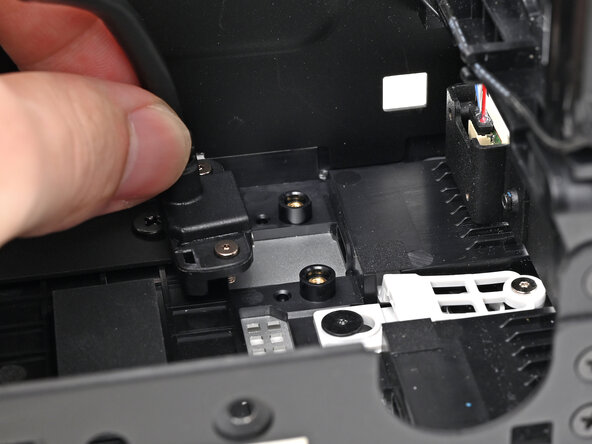
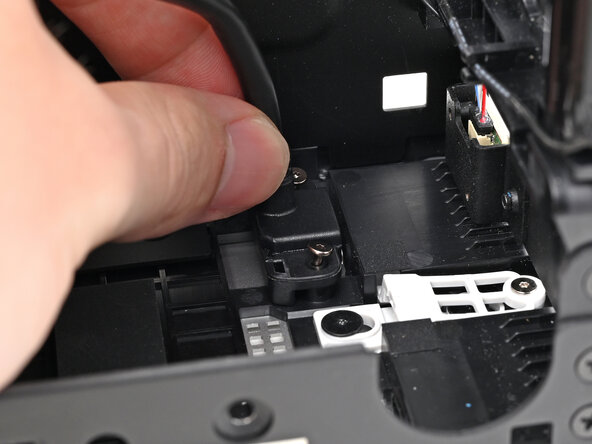
    1. Framework Desktop Expansion Card Cables Installation, Place the Expansion Card cables: step 1, image 1 of 2 Framework Desktop Expansion Card Cables Installation, Place the Expansion Card cables: step 1, image 2 of 2
      • Insert the the Expansion Card cable into its slot and align it over its two screw pegs.

      • Repeat for the other Expansion Card cable.

      Ask FixBot

      Add Comment

    2. Framework Desktop Expansion Card Cables Installation, Install the Expansion Card cable screws: step 2, image 1 of 1
      • Use your Framework Desktop Screwdriver to install the four captive T5 Torx screws securing the two Expansion Card cables.

      Ask FixBot

      Add Comment

Conclusion

To reassemble your device, follow these instructions in reverse order.

Cancel: I did not complete this guide.

Alex Diaz-Kokaisl

Member since: 01/16/22

250,027 Reputation

1,203 Guides authored

0 Guide Comments

Add Comment

View Statistics:

Past 24 Hours: 0

Past 7 Days: 2

Past 30 Days: 5

All Time: 59