Free Shipping on Domestic Orders $75+

Flydigi Vader 4 Pro Action Button Replacement

What you need

  1. Flydigi Vader 4 Pro Action Button Replacement, Front Case: step 1, image 1 of 3 Flydigi Vader 4 Pro Action Button Replacement, Front Case: step 1, image 2 of 3 Flydigi Vader 4 Pro Action Button Replacement, Front Case: step 1, image 3 of 3
    • Remove the four 10 mm screws on the rear case using a Phillips #0 screwdriver.

    Ask FixBot

    Add Comment

  2. Flydigi Vader 4 Pro Action Button Replacement: step 2, image 1 of 2 Flydigi Vader 4 Pro Action Button Replacement: step 2, image 2 of 2
    • Insert an opening pick into the seam between the rear and front case.

    • Pry around the perimeter of the controller.

    • Remove the rear case and set it to the side of the front case, with care not to strain the connected cable.

    Ask FixBot

    Add Comment

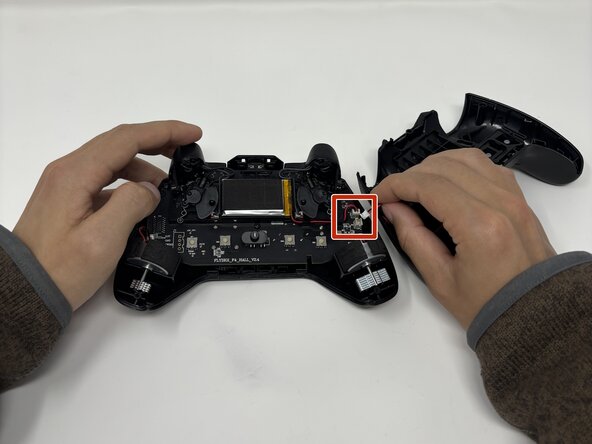
  3. Flydigi Vader 4 Pro Action Button Replacement: step 3, image 1 of 1
    • Disconnect the JST-PH connector from its motherboard socket.

    Ask FixBot

    Add Comment

  4. Flydigi Vader 4 Pro Action Button Replacement, Vibration Motors: step 4, image 1 of 2 Flydigi Vader 4 Pro Action Button Replacement, Vibration Motors: step 4, image 2 of 2
    • Disconnect each of the two vibration motor connectors.

    • Remove the vibration motors.

    Ask FixBot

    Add Comment

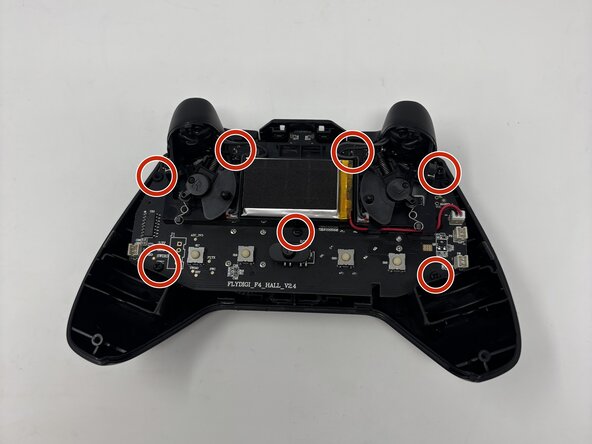
  5. Flydigi Vader 4 Pro Action Button Replacement, Mainboard: step 5, image 1 of 3 Flydigi Vader 4 Pro Action Button Replacement, Mainboard: step 5, image 2 of 3 Flydigi Vader 4 Pro Action Button Replacement, Mainboard: step 5, image 3 of 3
    • Remove the seven 10 mm screws securing the mainboard using a Phillips #0 screwdriver.

    Ask FixBot

    Add Comment

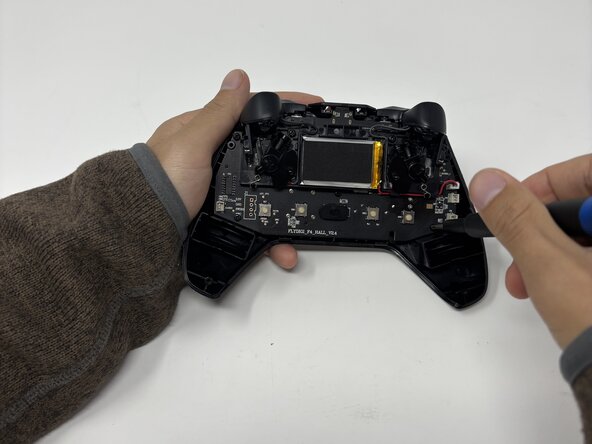
  6. Flydigi Vader 4 Pro Action Button Replacement: step 6, image 1 of 3 Flydigi Vader 4 Pro Action Button Replacement: step 6, image 2 of 3 Flydigi Vader 4 Pro Action Button Replacement: step 6, image 3 of 3
    • Remove the mainboard.

    Ask FixBot

    Add Comment

  7. Flydigi Vader 4 Pro Action Button Replacement, Action Button: step 7, image 1 of 3 Flydigi Vader 4 Pro Action Button Replacement, Action Button: step 7, image 2 of 3 Flydigi Vader 4 Pro Action Button Replacement, Action Button: step 7, image 3 of 3
    • Remove the four 6 mm screws securing the action buttons bracket with a Phillips #00 screwdriver.

    Ask FixBot

    Add Comment

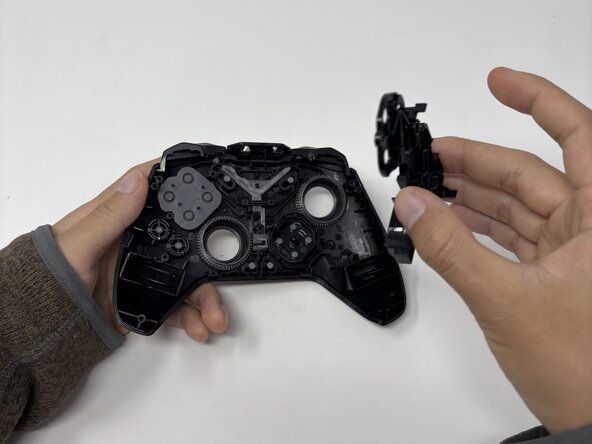
  8. Flydigi Vader 4 Pro Action Button Replacement: step 8, image 1 of 3 Flydigi Vader 4 Pro Action Button Replacement: step 8, image 2 of 3 Flydigi Vader 4 Pro Action Button Replacement: step 8, image 3 of 3
    • Remove the bracket.

    Ask FixBot

    Add Comment

  9. Flydigi Vader 4 Pro Action Button Replacement: step 9, image 1 of 2 Flydigi Vader 4 Pro Action Button Replacement: step 9, image 2 of 2
    • Remove the rubber action button gasket.

    Ask FixBot

    Add Comment

  10. Flydigi Vader 4 Pro Action Button Replacement: step 10, image 1 of 2 Flydigi Vader 4 Pro Action Button Replacement: step 10, image 2 of 2
    • Replace the action buttons.

    Ask FixBot

    Add Comment

Conclusion

To reassemble your device, follow these instructions in reverse order.

Cancel: I did not complete this guide.

Maklee Rhoades

Member since: 02/03/26

171 Reputation

1 Guide authored

0 Guide Comments

Add Comment

View Statistics:

Past 24 Hours: 2

Past 7 Days: 24

Past 30 Days: 58

All Time: 100