Fix Redmi Note 9 Pro Stuck On MIUI Logo

ZFix and
Last updated on Jan 7, 2026
Views: 17K
View statistics:
- Past 24 Hours:
- 7
- Past 7 Days:
- 55
- Past 30 Days:
- 176
- All Time:
- 16,920
Comments: 3
1 comment on steps, 2 guide comments.
Go to guide commentsCompleted: 11 12
11 people have marked this guide "completed." Will you be next?
12 people have marked this guide "completed." Including you — great job!
Favorites: 0 1
No one has favorited (and subscribed to) this guide. Will you be the first?
1 person has favorited (and subscribed to) this guide — and that's you!
Bullets!
Better coordination with markups and the color/type of bullets will help make this guide more clear!
Confusing Text
Some of this guide's text is confusing, duplicated, or off-topic. Clarify it by editing!
Needs More Images
A few more images would make this guide's procedures crystal clear.
Community-Contributed Guide
An awesome member of our community made this guide. It was not created by iFixit staff.
Better Introduction
Improve this guide by completing or revising its introduction.
What you need
Tools
-
-
Spudger4.9
-


Video Overview
-
-
-
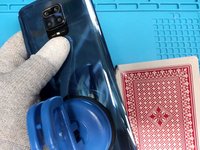
Warm up the device to soften the adhesive.
-
To separate the back cover, use plastic tools, a playing card, isopropyl alcohol and a suction cup.
 Ask FixBot
-
-
-
You can now remove the screws holding the plastic motherboard cover.
-
Pry the cover free.
-
-
-
-
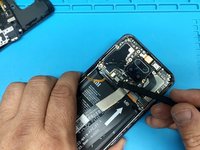
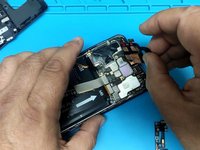
Disconnect the battery.
-
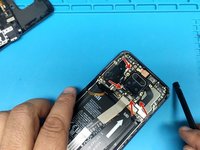
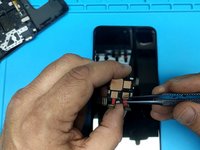
Disconnect all four flex cables from the camera and remove them.
-
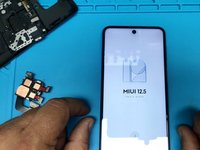
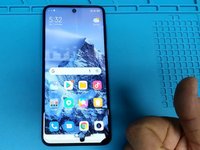
Now test the device without the camera.
-
-
-
If the phone starts normally, check and clean main camera connectors.
-
Check all conductive adhesive tapes and recover them.
-
Now you are ready to assemble the device.
-
-






To reassemble your device, follow these instructions in reverse order.
Cancel: I did not complete this guide.
11 other people completed this guide.