Introduction
Some Eufy RoboVac 11 model variants do not have an externally accessible battery compartment. It is located inside the device under the logic board, and requires disassembly to access.
What you need
-
-
Turn off Vacuum using switch on side.
-
Remove dust tray by pressing button and pulling out.
-
Remove center brush using 2 tabs to lift up door, then lift out brush assembly.
-
Remove 2 side brushes with PH #2 screwdriver
-
-
-
Remove the 6 PH1 screws securing the lower bumper retaining bracket and remove bracket.
-
Unplug the front bumper sensor cable and remove bumper
-
-
-
Use a screwdriver or pry tool to pop the front small wheel out
-
Remove the PH2 screw hidden below.
-
Remove the remaining 6 PH2 Screws holding the case together.
-
-
-
-
There are foam tape bumper stops that maybe sealing the case. Do not attempt to remove them. They should be carefully cut at the seam and left in place.
-
-
-
There is a cable connecting the top button board to the logic board, lift the case up carefully and unplug. The cable is fitted very tightly, you can carefully work down the side of it with a pry tool and work it out.
-
Alternatively, you can remove the 4x PH2 screws retaining the button board to the top.
-
-
-
The logic board should be fully exposed now.
-
Unplug the 9 marked connectors on the logic board to create enough slack to lift it up.
-
Unscrew 4x PH2 screws retaining the logic board.
-
-
-
Lift up or remove logic board, and remove the PH1 screw retaining the battery cover.
-
Disconnect the battery. Depending on the type of plug used, it may have clips or just be pressed together tightly.
-
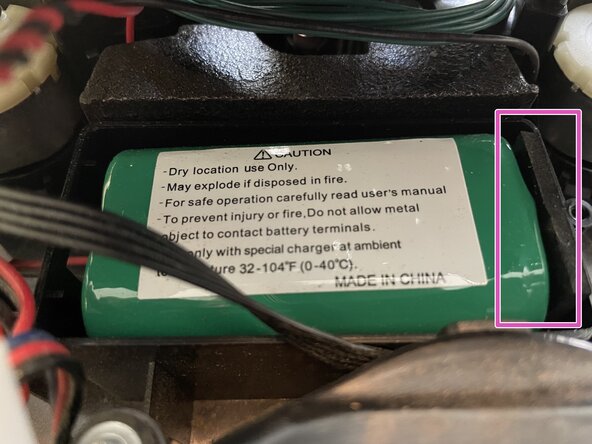
Work/wiggle the battery out of its holder. Using a spudger or similar pry tool to lift up on the bottom edge of the battery can help.
-




To reassemble your device, follow these instructions in reverse order.

