Free Shipping on Domestic Orders $75+

HP PSC 2410 Photosmart All In One Printer Encoder Strip Replacement

What you need

  1. HP PSC 2410 Photosmart All In One Printer Encoder Strip Replacement, Remove Back Panel: step 1, image 1 of 1
    • Remove the back panel by inserting your fingers into the indentations next to the tabs. Press the tabs inward towards each other while pulling the back panel toward you.

    Ask FixBot
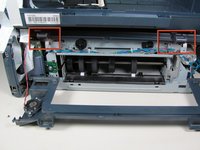
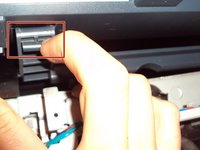
  2. HP PSC 2410 Photosmart All In One Printer Encoder Strip Replacement, Remove Inner Back Pannel: step 2, image 1 of 2 HP PSC 2410 Photosmart All In One Printer Encoder Strip Replacement, Remove Inner Back Pannel: step 2, image 2 of 2
    • Using the T10 Torx Security Bit Screwdriver, unscrew the screws on the upper left and right corners of the inner panel to remove the inner back panel.

    Ask FixBot
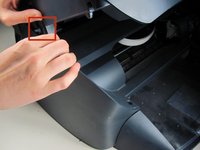
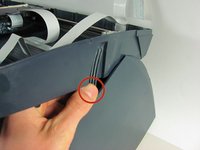
  3. HP PSC 2410 Photosmart All In One Printer Encoder Strip Replacement, Remove Upper Portion: step 3, image 1 of 2 HP PSC 2410 Photosmart All In One Printer Encoder Strip Replacement, Remove Upper Portion: step 3, image 2 of 2
    • Press down on the two plastic hinges to remove the upper portion of printer.

    Ask FixBot
  4. HP PSC 2410 Photosmart All In One Printer Encoder Strip Replacement, Unplug Speaker Wire: step 4, image 1 of 1
    • Grasp the plastic plug on the end of the speaker wire, then gently pull the plug away from the printer until the wire is removed.

    Ask FixBot
  5. HP PSC 2410 Photosmart All In One Printer Encoder Strip Replacement, Removing Scanner Tray: step 5, image 1 of 2 HP PSC 2410 Photosmart All In One Printer Encoder Strip Replacement, Removing Scanner Tray: step 5, image 2 of 2
    • Rotate the printer so the paper tray is facing towards you.

    • Gently lift the scanner tray up and away from the printer.

    • Press the gray plastic tabs inward to release the tabs from the printer.

    Ask FixBot
  6. HP PSC 2410 Photosmart All In One Printer Encoder Strip Replacement, Removing Scanner Tray - cont.: step 6, image 1 of 1
    • Returning to the back of the printer, remove the scanner from the back hinges.

    • With pressure applied, the scanner will detach easily.

    Ask FixBot
  7. HP PSC 2410 Photosmart All In One Printer Encoder Strip Replacement: step 7, image 1 of 1
    • Gently grasp and unplug the two white ribbon cables from the printer body.

    • Be sure to grasp the cable at the connector and not to pull on the wires themselves.

    Ask FixBot
  8. HP PSC 2410 Photosmart All In One Printer Encoder Strip Replacement: step 8, image 1 of 1
    • Unplug the white plastic multi-wire connector (with orange, black, red, and brown wires) from it's port.

    • Be sure to grasp the white connector and not to pull on the wires themselves.

    Ask FixBot
  9. HP PSC 2410 Photosmart All In One Printer Encoder Strip Replacement, Detaching the Scanner Tray: step 9, image 1 of 1
    • Detach the scanner tray from the printer by lifting the scanner tray off the printer body.

    Ask FixBot
  10. HP PSC 2410 Photosmart All In One Printer Encoder Strip Replacement, Encoder Strip: step 10, image 1 of 2 HP PSC 2410 Photosmart All In One Printer Encoder Strip Replacement, Encoder Strip: step 10, image 2 of 2
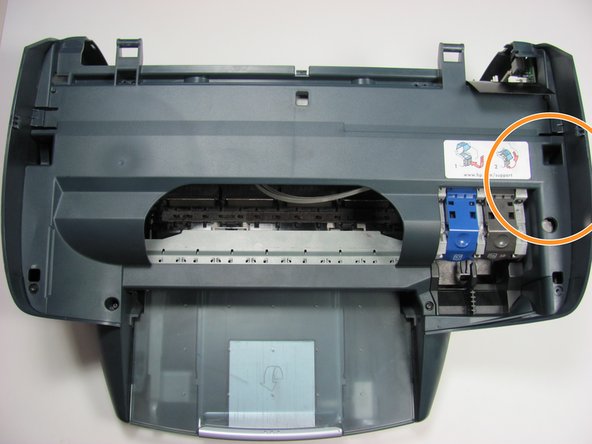
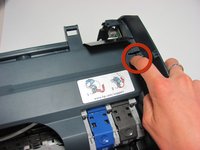
    • Locate the panel labeled with a HP support link sticker.

    • Release the tab by the support link sticker.

    • Remove the black screw below the tab.

    Ask FixBot
  11. HP PSC 2410 Photosmart All In One Printer Encoder Strip Replacement: step 11, image 1 of 1
    • Remove the two black screws closest to the printer tray.

    Ask FixBot
  12. HP PSC 2410 Photosmart All In One Printer Encoder Strip Replacement: step 12, image 1 of 1
    • Unhook the encoder strip from its small silver hooks and remove it from the printer.

    • To replace, feed the new encoder strip through the silver hooks.

    Ask FixBot
Conclusion

To reassemble your device, follow these instructions in reverse order.

4 other people completed this guide.

Jeremy Mahrt

Member since: 05/08/11

286 Reputation

2 Guides authored

Team

Cal Poly, Team 12-31, Maness Spring 2011 Member of Cal Poly, Team 12-31, Maness Spring 2011

CPSU-MANESS-S11S12G31

5 Members

9 Guides authored

0 Guide Comments

Add Comment

View Statistics:

Past 24 Hours: 0

Past 7 Days: 7

Past 30 Days: 72

All Time: 29,967