Introduction
This is a guide on how to replace the ear pads on the Edifier W820NB Plus. The ear pads are the part that contact you while wearing the headphones. You will not need to do any difficult steps, but pry open the earpads carefully.
What you need
-
-
-
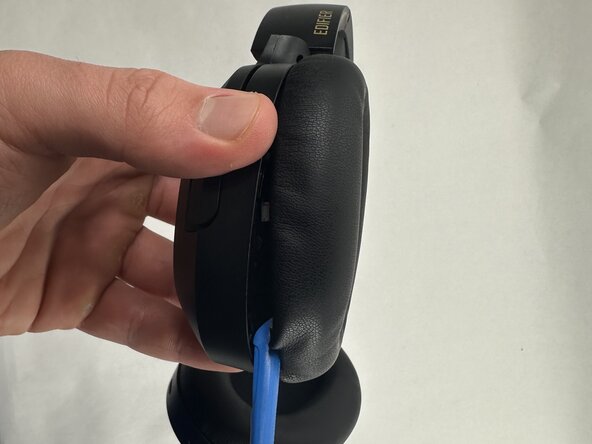
Hold the driver housing in one hand and insert an opening tool into the seam between the earpad and driver housing.
-
-
-
-
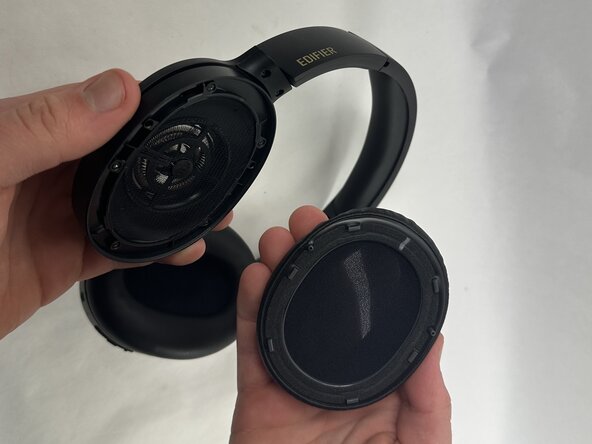
With your inserted opening tool, pry around the perimeter of the ear pad until it fully releases.
-

 Ask FixBot




To reassemble your device, follow these instructions in reverse order.
Cancel: I did not complete this guide.
One other person completed this guide.

Team

UMass Dartmouth, Team 2-7, Botvin Spring 2025 Member of UMass Dartmouth, Team 2-7, Botvin Spring 2025
UMASSD-BOTVIN-S25S2G7
3 Members
60 Guides authored
