
Ecovacs Deebot 900 Front Bumper Replacement

Gillian Blumer and
Last updated on May 28, 2020
Views: 14K
View statistics:
- Past 24 Hours:
- 7
- Past 7 Days:
- 37
- Past 30 Days:
- 183
- All Time:
- 13,922
Comments: 5
4 comments on steps, 1 guide comment.
Go to guide commentsCompleted: 1 2
1 person has marked this guide "completed." Will you be next?
2 people have marked this guide "completed." Including you — great job!
Favorites: 0 1
No one has favorited (and subscribed to) this guide. Will you be the first?
1 person has favorited (and subscribed to) this guide — and that's you!
Better Introduction
Improve this guide by completing or revising its introduction.
Introduction
Go to step 1 ↓The front bumper of the Ecovacs Deebot 900 is used to sense obstacles in its path. A malfunctioning front bumper can cause the Deebot to move in a circular fashion. Use this guide to remove or replace the front bumper on your Ecovacs 900 Deebot.
What you need
Tools


-
-
-
Using a Phillips #0 screwdriver, remove the two 12.25 mm screws holding the battery cover in place.
-
-
-
-
Using the two white straps on the sides of the battery, gently remove the battery.
-
-
-
Carefully disconnect the battery cable by pulling near the connector at the bottom of the battery compartment.
-
-
-
-
Using a Phillips #00 screwdriver, remove the eight screws on the bottom edge of the bumper.
-
-
-
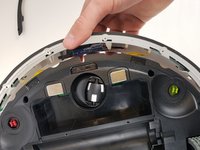
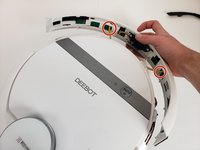
Disconnect the two cables connecting the bumper to the body of the Deebot.
-
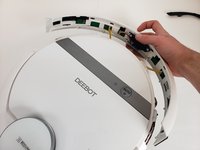
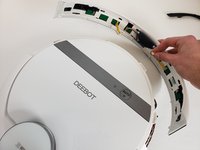
Remove the front bumper from the device.
-
-

 Ask FixBot




To reassemble your device, follow these instructions in reverse order.
Cancel: I did not complete this guide.
One other person completed this guide.

Team

Embry-Riddle Aeronautical University, Team S6-G1, Rauch Spring 2020 Member of Embry-Riddle Aeronautical University, Team S6-G1, Rauch Spring 2020
ERAU-RAUCH-S20S6G1
3 Members
72 Guides authored
1 Guide Comment
Where may I buy the front bumper assembly? I'm trying to replace one for a deebot 901 but the mfg tells me they don't see the part directly.
