Introduction
This guide will teach you how to replace the backplate of the EasySMX ESM-9110 controller.
What you need
-
-
-
Use a Phillips #000 screwdriver to remove the two 10 mm screws from the back of controller.
 Ask FixBot
-
-
-
Insert a plastic opening tool into the slit on the side of controller.
-
Wiggle the tool until the cover becomes loose.
-
Repeat this on the other side of Controller.
-
-
-
-
-
-
Use a Phillips #000 screwdriver to remove four 20 mm screws from the controller's faceplate.
-
Use a Phillips #000 screwdriver (a screwdriver bit extension may be needed) to remove the two 20 mm screws from the controllers faceplate.
-
-
-
Remove the faceplate of the controller by lifting it directly up from the backplate.
-
-
-
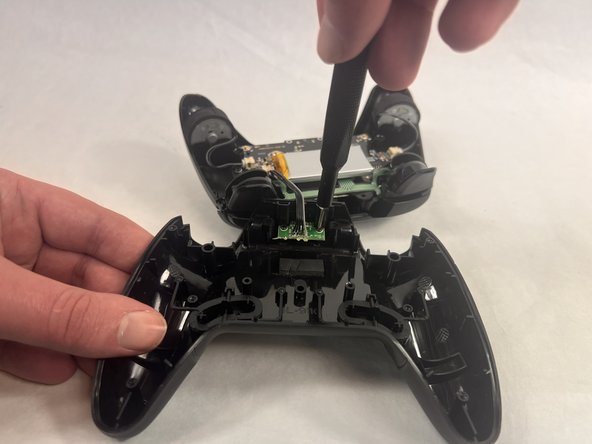
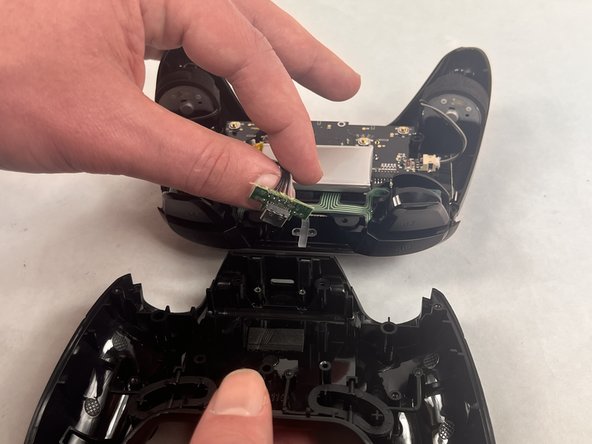
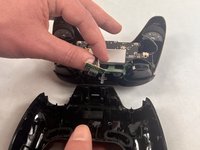
Use a Phillips #000 screwdriver to remove the two 10 mm screws from the daughterboard off the backplate.
-
Remove the daughterboard once screws are off.
-
-


To reassemble your device, follow these instructions in reverse order.
Cancel: I did not complete this guide.
One other person completed this guide.

Team

UMass Dartmouth, Team 2-4, Konn Spring 2024 Member of UMass Dartmouth, Team 2-4, Konn Spring 2024
UMASSD-KONN-S24S2G4
4 Members
60 Guides authored
