Introduction
Does your Eastern Times Tech T7 gaming mouse register a double-click when you only press it once, or fail to register clicks at all? You can fix this common issue by replacing the faulty left-click microswitch. This guide will show you how to open the mouse's outer casing, detach the internal components, desolder the broken switch, and solder in a brand-new one.
Before you begin, ensure you have a clean and well-ventilated workspace. You will be using a soldering iron that reaches high temperatures, so please be careful to avoid burns.
What you need
-
-
-
Use a spudger to carefully peel the mouse skates off the bottom of the mouse.
 Ask FixBot
-
-
-
Use a Phillips #00 screwdriver to remove the four 1.4 mm Phillips #00 screws securing the outer casing.
-
-
-
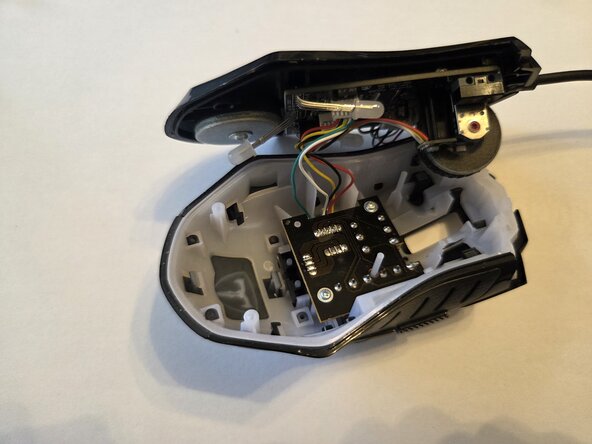
Gently lift the top casing to open the mouse and reveal the internal components.
-
-
-
Use tweezers to carefully pull the internal cable connector straight out of its socket.
-
-
-
-
Use a Phillips #00 screwdriver to remove the one 1.4 mm Phillips #00 screws securing the printed circuit board (PCB).
-
-
-
Use tweezers to gently lift and remove the scroll wheel from the circuit board.
-
-
-
Heat the three switch pins on the back of the circuit board with a soldering iron.
-
Use a desoldering pump to remove the melted solder from each pin.
-
-
-
Use tweezers to pull the existing microswitch out from the circuit board.
-
Insert the pins of the new microswitch into the correct holes on the circuit board.
-
-
-
Melt a small amount of rosin core solder onto each of the three pins on the back of the circuit board to secure the new switch.
-
-




To reassemble your device, follow these instructions in reverse order.

Team

Austin Community College, Team 57-5, Kapoor Summer 2026 Member of Austin Community College, Team 57-5, Kapoor Summer 2026
AUSTINCC-KAPOOR-SU26S57G5
1 Member
12 Guides authored
