
Compaq Evo N1000v Fan Replacement

Alex Hernandez and 3 other contributors
Last updated on Jan 28, 2014
Views: 6.7K
View statistics:
- Past 24 Hours:
- 1
- Past 7 Days:
- 13
- Past 30 Days:
- 89
- All Time:
- 6,673
Comments: 6
4 comments on steps, 2 guide comments.
Go to guide commentsCompleted: 1 2
1 person has marked this guide "completed." Will you be next?
2 people have marked this guide "completed." Including you — great job!
Favorites: 2 3
2 people have favorited (and subscribed to) this guide. Will you be next?
3 people have favorited (and subscribed to) this guide — including you!
Action Shots
Be an action hero! This guide needs images that better demonstrate how to perform specific actions.
Missing Steps
Oops! This guide is currently missing one or more important steps.
Inconsistent Images
Updating the images on this guide to be more consistent with the prerequisites would increase its awesomeness.
Needs Better Images
Better photos will improve this guide. Help out by taking, editing, or uploading new ones!
Introduction
Go to step 1 ↓A guide on how to remove the Fan.
What you need
Tools
-
Spudger4.9


-
-
-
Using a TR8 Torx screwdriver, remove the two T8 Torx screws that secure the LED cover to the base enclosure.
-
-
-
While holding the F1 and F2 keys, insert a spudger between the keys into the notch in the LED cover. Lift up.
-
-
-
While holding the Scroll and Pause keys, insert a spudger between the keys into the notch in the LED cover. Lift up.
-
-
-
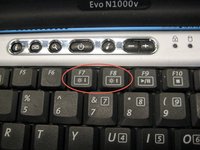
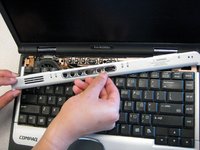
Insert a spudger between the F7 and F8 keys. Lift up to remove the LED cover.
-
-
-
-
-
-
Remove the battery.
-
Remove the screw from the metal support on the case edge with a Torx T8 screwdriver.
-
Flip the laptop over again so the top is facing up.
-
Open the laptop screen and face it towards you.
-
-
-
Lift the the palm rest up from the front edge of the laptop and swing it towards the screen.
-
-
-
-
-
Remove the two TM 2.5mm x 8.0mm screws that secure the top cover to the base.
-
-
-
Remove the three TM 2.5 mm x 5.0 mm screws that secure the top cover to the base.
-
-
-
Lift the top cover straight up about one inch, then slide forward until the microphone cable is exposed.
-
Disconnect the microphone cable from the system board.
-
-

 Ask FixBot




To reassemble your device, follow these instructions in reverse order.
Cancel: I did not complete this guide.
One other person completed this guide.

Team

Cal Poly, Team 29-74, Johann Spring 2010 Member of Cal Poly, Team 29-74, Johann Spring 2010
CPSU-JOHANN-S10S29G74
3 Members
84 Guides authored
2 Guide Comments
Please DO NOT firmly remove any connectors. Most connectors have locks. In step 20 you can see the two different colors of the connector the bottom is black and the top (the lock) is brown. Each side of the lock sticks out further than the connector. One side at a time pull back on the lock. Connection should come out with no force. to reconnect, seat connection and push lock back in place. If any issues try unlocking and re-seat connection.
