
Doov v15 Sim Card Replacement

Imani Williams and
Last updated on Dec 29, 2023
Views: 550
View statistics:
- Past 24 Hours:
- 7
- Past 7 Days:
- 17
- Past 30 Days:
- 70
- All Time:
- 550
Comments: 0
No one has left comments on this guide. Will you be first?
Go to guide commentsCompleted: 0 1
No one has marked this guide "completed." Will you be the first?
1 person has marked this guide "completed." It's you — great job!
Favorites: 0 1
No one has favorited (and subscribed to) this guide. Will you be the first?
1 person has favorited (and subscribed to) this guide — and that's you!
Needs Better Images
Better photos will improve this guide. Help out by taking, editing, or uploading new ones!
Introduction
Go to step 1 ↓A guide on how to replace a Sim Card inside of DoovV15 smartphone.
Make sure there's a sim card that matches up to the DoovV15 smartphone.
Work in a clean, well-lit area.
Use appropriate tools like a opening tool, and Jimmy.
Ensure you have the necessary safety gear to protect your eyes and hands.
Back up your data and power off the phone before you start. For additional help please use the step by step guide.
What you need
Tools


-
-
-
Use the Jimmy to crack open the phone's back cover. Slide it under an edge of the phones back cover and carefully loosen the edge. The casing should pop open slightly.
 Ask FixBot
-
-
-
Use an Ifixit opening tool and slide it around the phones back cover. The Sim Card will be visible above the battery to the right.
-
-
-
-
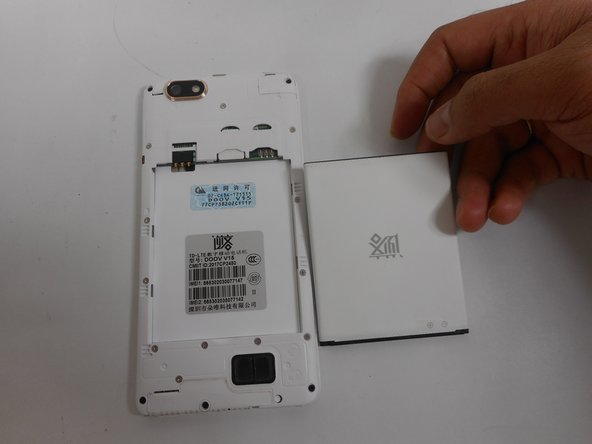
Disconnect the battery: Once the back casing is removed, the battery will be visible. Use the ifixit opening tool to remove the battery. Place the ifixit opening tool at the top of the battery and pull it back, or simply use your hand to remove it.
-
-
-
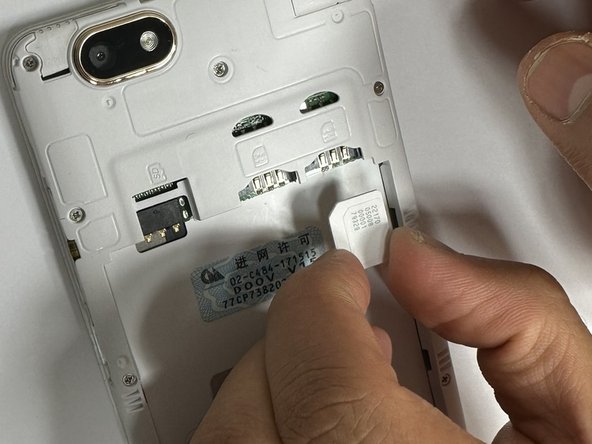
Use the Ifixit opening tool and place it in the hole above the SIM card slot and push it downwards, so the SIM card slides downward. Place the iFixit opening tool on the now more visible SIM card and slide it down for an easy removal.
-
-
-
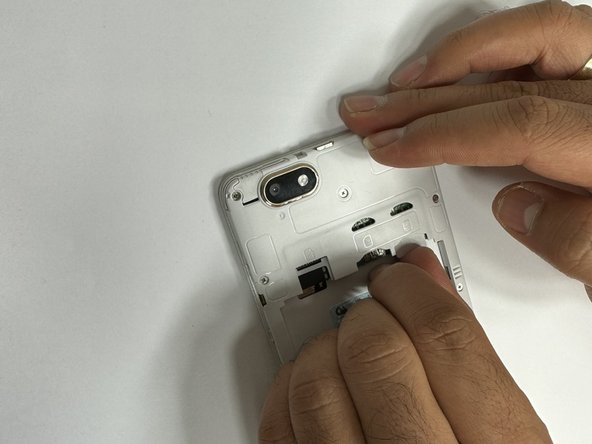
Place the new SIM card in the slot by sliding it back in the slot, as shown in the figure (facing the sim number and code upward.)
-
-








To reassemble your device, follow these instructions in reverse order.

Team

University of New Orleans, Team 5-3, McDonald Fall 2023 Member of University of New Orleans, Team 5-3, McDonald Fall 2023
UNO-MCDONALD-F23S5G3
4 Members
60 Guides authored
