Introduction
This guide shows how to open a Uniden R8 to access the main board for cleaning, inspection, or basic troubleshooting.
What you need
-
-
-
Turn the detector off and unplug all cables, mounts, and accessories.
-
Place the unit face-down on an ESD-safe surface.
-
Clean hands or wear gloves to avoid contaminating the interior.
 Ask FixBot
-
-
-
-
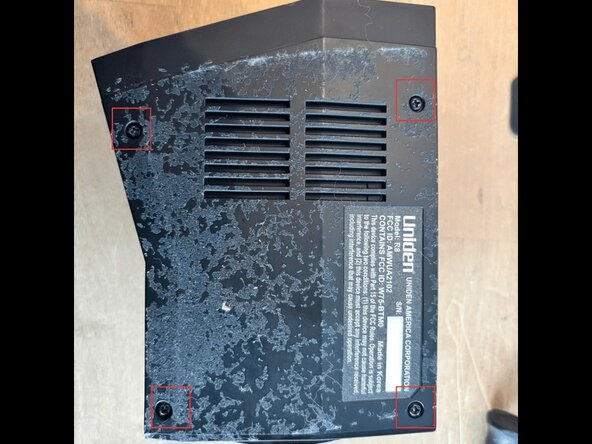
Locate the four Phillips screws on the bottom shell.
-
Using a Phillips #0, remove all four screws.
-
Sort and label the screws so you can return them to their original locations.
-
-
-
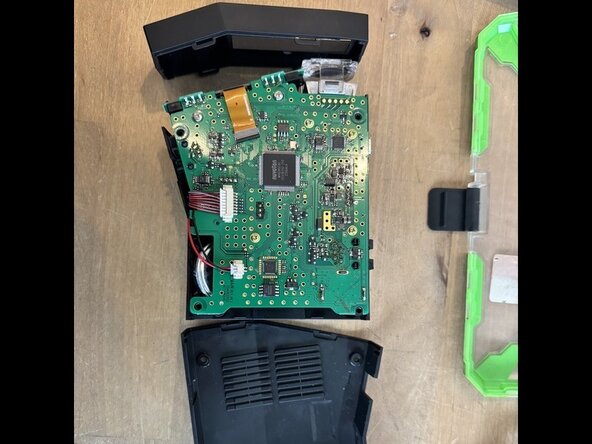
Starting at a rear corner, gently lift the top cover.
-
As the cover rises, watch the USB-Micro opening: the plastic lip can catch on the port.
-
If it binds, insert a plastic pick between the shell and the port cutout to relieve pressure.
-
Optional—access to speaker and adjacent parts:
-
Carefully lift the main board just enough to reach the speaker (and nearby connectors/components).
-
Handle the board by the edges only. Do not yank, watch for any wires or short ribbon leads attached underneath.
-
If a connector resists, use a spudger to gently work it free; avoid prying on components.
-
-
To reassemble your device, follow these instructions in reverse order.

