15% Off Selected iFixit Tools — Limited Time
Free Shipping on Domestic Orders $75+

Disassembling Konnet PowerEZ Pro External Battery

What you need

  1. Disassembling Konnet PowerEZ Pro External Battery, External Rechargable Battery: step 1, image 1 of 2 Disassembling Konnet PowerEZ Pro External Battery, External Rechargable Battery: step 1, image 2 of 2
    • Take a small flat screwdriver or any plastic opening tool and start to remove the silver cover.

    • The backing has lots of double sided tape to hold this down so some force will be required.

    Ask FixBot

    Add Comment

  2. Disassembling Konnet PowerEZ Pro External Battery: step 2, image 1 of 2 Disassembling Konnet PowerEZ Pro External Battery: step 2, image 2 of 2
    • Remove 4 Philips screws to release the plastic cover

    Ask FixBot

    Add Comment

  3. Disassembling Konnet PowerEZ Pro External Battery: step 3, image 1 of 2 Disassembling Konnet PowerEZ Pro External Battery: step 3, image 2 of 2
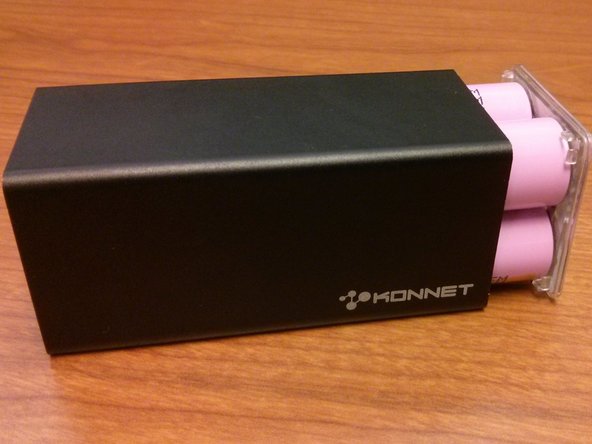
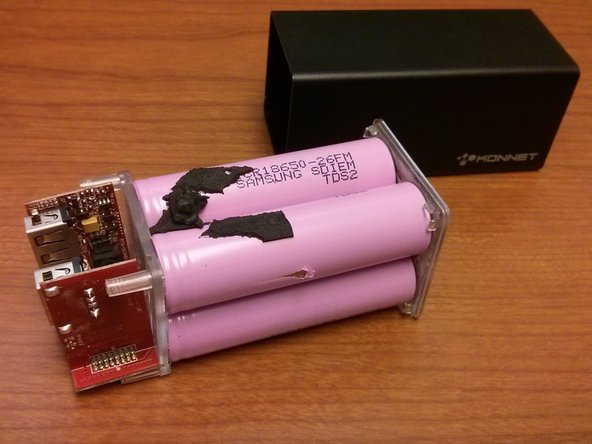
    • Carefully push from the side you just opened. All the inside parts should slide out from the back of the unit.

    Ask FixBot

    Add Comment

Conclusion

To reassemble your device, follow these instructions in reverse order.

Cancel: I did not complete this guide.

5 other people completed this guide.

Mike Sikorski

Member since: 07/10/14

245 Reputation

1 Guide authored

0 Guide Comments

Add Comment

View Statistics:

Past 24 Hours: 0

Past 7 Days: 4

Past 30 Days: 22

All Time: 2,176