Free Shipping on Domestic Orders $75+

Disassembling Flip Video Circuit Board

What you need

    1. Disassembling Flip Video Circuit Board, Outer Shell: step 1, image 1 of 2 Disassembling Flip Video Circuit Board, Outer Shell: step 1, image 2 of 2
      • Turn off the device and take the batteries out.

      • Remove metal sticker under the LCD screen with a spudger.

      • This may require a large force to pry off the glued sticker.

      Ask FixBot

      Add Comment

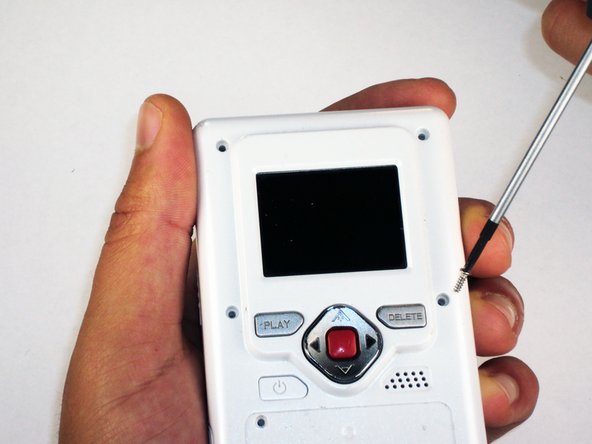
    2. Disassembling Flip Video Circuit Board: step 2, image 1 of 1
      • Remove the 4 gray screw caps with the spudger. These cover the screw heads and protect from dirt or grime.

      Ask FixBot

      Add Comment

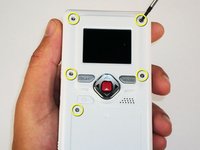
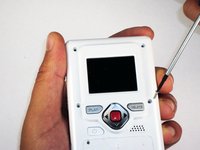
    3. Disassembling Flip Video Circuit Board: step 3, image 1 of 2 Disassembling Flip Video Circuit Board: step 3, image 2 of 2
      • Remove the 5 10mm screws with the #00 Phillips screwdriver. These connect the back of the outer shell to the front of the outer shell.

      Ask FixBot

      Add Comment

    4. Disassembling Flip Video Circuit Board: step 4, image 1 of 1
      • Open battery door. This can be done by gently depressing and sliding the battery down downward.

      Ask FixBot

      Add Comment

    5. Disassembling Flip Video Circuit Board: step 5, image 1 of 1
      • Use the spudger to separate outer shells.

      • The spudger must be inserted between the shell halves to pry the edges apart.

      • Slowly work around the outside to separate the halves.

      Ask FixBot

      Add Comment

    1. Disassembling Flip Video Circuit Board, Circuit Board: step 6, image 1 of 1
      • Remove the 3 5mm screws securing the circuit board to the front shell with the #00 Phillips screwdriver.

      Ask FixBot

      Add Comment

    2. Disassembling Flip Video Circuit Board: step 7, image 1 of 1
      • Slowly lift the left side of the circuit board.

      • Do not attempt to remove the circuit board completely yet. It is still connected to the device.

      Ask FixBot

      Add Comment

    3. Disassembling Flip Video Circuit Board: step 8, image 1 of 1
      • Disconnect the USB port cable from the back side of the circuit board.

      Ask FixBot

      Add Comment

    4. Disassembling Flip Video Circuit Board: step 9, image 1 of 1
      • Slide out the battery contacts.

      • Battery contacts

      • Slot where battery contacts were located

      Ask FixBot

      Add Comment

Conclusion

To reassemble your device, follow these instructions in reverse order.

Cancel: I did not complete this guide.

One other person completed this guide.

Elizabeth

Member since: 04/15/10

100 Reputation

6 Guides authored

Team

Cal Poly, Team 26-21, Regan Spring 2010 Member of Cal Poly, Team 26-21, Regan Spring 2010

CPSU-REGAN-S10S26G21

4 Members

12 Guides authored

1 Guide Comment

Thank you. Where is the reset button on these first generation Flip Videos (mine doesn’t have one visible on outside, must be on inside.

sherrygray - Reply Share

Add Comment

View Statistics:

Past 24 Hours: 1

Past 7 Days: 12

Past 30 Days: 50

All Time: 2,752