15% Off Selected iFixit Tools — Limited Time
Free Shipping on Domestic Orders $75+

Disassembling DualShock 4 Controller

Prerequisite Only
This is a prerequisite-only guide! This guide is part of another procedure and isn’t meant to be used alone.

What you need

  1. Disassembling DualShock 4 Controller, Controller: step 1, image 1 of 1
    • Using the Phillips #00 Screwdriver, remove the four 6.0 mm screws securing the rear cover to the controller.

    • Be careful loosening the screws, using the wrong sized screwdriver, or letting the screwdriver slip can permanently damage the screw heads, making removal extremely difficult.

    Ask FixBot

    Add Comment

  2. Disassembling DualShock 4 Controller: step 2, image 1 of 3 Disassembling DualShock 4 Controller: step 2, image 2 of 3 Disassembling DualShock 4 Controller: step 2, image 3 of 3
    • Four fragile plastic clips hold the casing together. You can see their locations more clearly in this guide.

    • The clips help hold the seams together. If you break these clips, the controller will still work.

    • Beginning with the left handle:

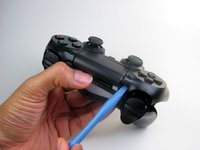
    • Pinch the left handle of the controller to introduce an opening.

    • Wedge a plastic opening tool into the opening and slide it up towards the joystick.

    • Pull down on tool to pry open the casing.

    • Repeat these steps for the right handle.

    Ask FixBot

    Add Comment

  3. Disassembling DualShock 4 Controller: step 3, image 1 of 3 Disassembling DualShock 4 Controller: step 3, image 2 of 3 Disassembling DualShock 4 Controller: step 3, image 3 of 3
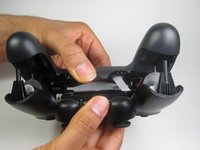
    • Wedge a plastic opening tool into the case-splittings and pull down to crack open the casing near the following buttons:

    • Share button

    • Options button

    • Split the plastic covers of the controller apart, taking note that they will still be attached by circuit board ribbons.

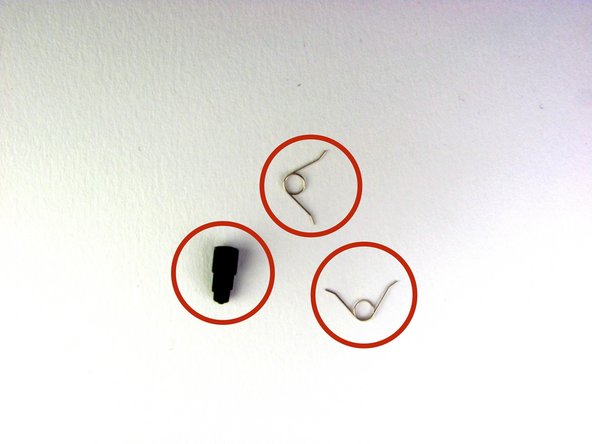
    • Three small pieces are often released from the framework. To prevent loss, maintain a controlled work field.

    • 2 Trigger Springs

    • 1 Grey Reset Button Extension

    Ask FixBot

    Add Comment

Conclusion

To reassemble your device, follow these instructions in reverse order.

Cancel: I did not complete this guide.

One other person completed this guide.

Mark

Member since: 01/21/14

8,088 Reputation

7 Guides authored

Team

Cal Poly, Team 6-21, Maness Winter 2014 Member of Cal Poly, Team 6-21, Maness Winter 2014

CPSU-MANESS-W14S6G21

4 Members

35 Guides authored

0 Guide Comments

Add Comment

View Statistics:

Past 24 Hours: 0

Past 7 Days: 4

Past 30 Days: 40

All Time: 2,605