Free Shipping on Domestic Orders $75+

Disassembling Compaq Mini 110 Power Pass-Through Board

What you need

  1. Disassembling Compaq Mini 110 Power Pass-Through Board, Battery: step 1, image 1 of 2 Disassembling Compaq Mini 110 Power Pass-Through Board, Battery: step 1, image 2 of 2
    • Locate the battery and the battery tabs on the bottom of the Compaq Mini.

    Ask FixBot

    Add Comment

  2. Disassembling Compaq Mini 110 Power Pass-Through Board: step 2, image 1 of 3 Disassembling Compaq Mini 110 Power Pass-Through Board: step 2, image 2 of 3 Disassembling Compaq Mini 110 Power Pass-Through Board: step 2, image 3 of 3
    • Push both tabs inward simultaneously and slide the battery out.

    Ask FixBot

    Add Comment

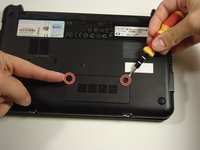
  3. Disassembling Compaq Mini 110 Power Pass-Through Board, RAM: step 3, image 1 of 2 Disassembling Compaq Mini 110 Power Pass-Through Board, RAM: step 3, image 2 of 2
    • Use a Philips #0 screwdriver to unscrew the two screws covering the memory compartment on the bottom of the laptop and remove the cover.

    Ask FixBot

    Add Comment

  4. Disassembling Compaq Mini 110 Power Pass-Through Board: step 4, image 1 of 1
    • Push out the side tabs simultaneously and pull out the old RAM module.

    • When inserting a new RAM stick, be sure to evenly insert the gold pins in the same orientation that the old module was removed. While sliding the module in, press the side tabs in place.

    Ask FixBot

    Add Comment

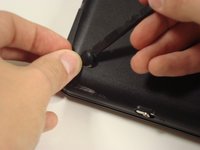
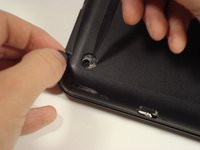
  5. Disassembling Compaq Mini 110 Power Pass-Through Board, Keyboard: step 5, image 1 of 2 Disassembling Compaq Mini 110 Power Pass-Through Board, Keyboard: step 5, image 2 of 2
    • Remove the rubber pads located on the corners of your Compaq Mini.

    • There may be junk underneath it. This is residue left from the glue that held on the rubber pad. Just scrape it away to find the screw.

    Ask FixBot

    Add Comment

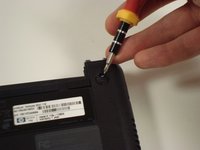
  6. Disassembling Compaq Mini 110 Power Pass-Through Board: step 6, image 1 of 2 Disassembling Compaq Mini 110 Power Pass-Through Board: step 6, image 2 of 2
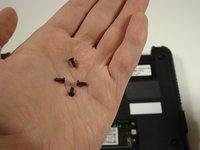
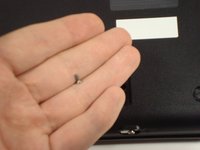
    • Unscrew all the corner screws. There are four total, one under each rubber pad.

    Ask FixBot

    Add Comment

  7. Disassembling Compaq Mini 110 Power Pass-Through Board: step 7, image 1 of 2 Disassembling Compaq Mini 110 Power Pass-Through Board: step 7, image 2 of 2
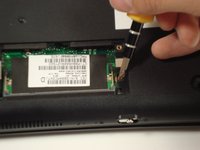
    • Unscrew the screw for the bottom case located in the RAM compartment.

    Ask FixBot

    Add Comment

  8. Disassembling Compaq Mini 110 Power Pass-Through Board: step 8, image 1 of 2 Disassembling Compaq Mini 110 Power Pass-Through Board: step 8, image 2 of 2
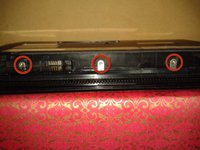
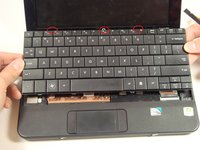
    • Remove the three screws in the silver tabs at the back of the keyboard.

    • These are located at the back of the base under the screen.

    • Lift the keyboard away from the laptop.

    Ask FixBot

    Add Comment

  9. Disassembling Compaq Mini 110 Power Pass-Through Board, Top Cover: step 9, image 1 of 1
    • Remove the eight screws that are from the plastic top cover.

    Ask FixBot

    Add Comment

  10. Disassembling Compaq Mini 110 Power Pass-Through Board: step 10, image 1 of 3 Disassembling Compaq Mini 110 Power Pass-Through Board: step 10, image 2 of 3 Disassembling Compaq Mini 110 Power Pass-Through Board: step 10, image 3 of 3
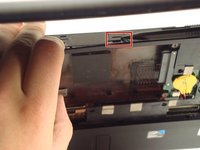
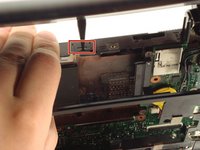
    • Pry up the top plastic cover using a spudger.

    • These two tabs under the screen need to be pushed in with a spudger.

    Ask FixBot

    Add Comment

  11. Disassembling Compaq Mini 110 Power Pass-Through Board: step 11, image 1 of 2 Disassembling Compaq Mini 110 Power Pass-Through Board: step 11, image 2 of 2
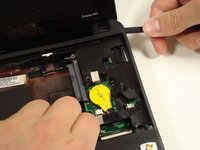
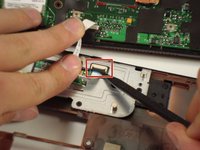
    • Remove the cable by carefully pulling it up.

    • Be careful when lifting up the cover because the track pad is still attached.

    Ask FixBot

    Add Comment

  12. Disassembling Compaq Mini 110 Power Pass-Through Board, Hard Drive: step 12, image 1 of 1
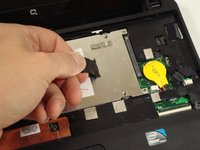
    • Remove the three screws holding the panel in place.

    Ask FixBot

    Add Comment

  13. Disassembling Compaq Mini 110 Power Pass-Through Board: step 13, image 1 of 2 Disassembling Compaq Mini 110 Power Pass-Through Board: step 13, image 2 of 2
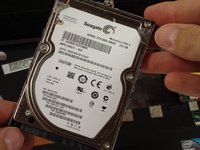
    • Pull up on the tab to remove the hard drive.

    Ask FixBot

    Add Comment

  14. Disassembling Compaq Mini 110 Power Pass-Through Board, Power Pass-Through Board: step 14, image 1 of 1
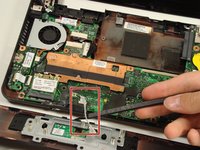
    • Detach the cables.

    Ask FixBot

    Add Comment

  15. Disassembling Compaq Mini 110 Power Pass-Through Board: step 15, image 1 of 1
    • Remove the two screws keeping the board in place.

    Ask FixBot

    Add Comment

Conclusion

To reassemble your device, follow these instructions in reverse order.

Cancel: I did not complete this guide.

3 other people completed this guide.

alea

Member since: 10/06/10

1,429 Reputation

14 Guides authored

Team

Cal Poly, Team 22-2, Maness Fall 2010 Member of Cal Poly, Team 22-2, Maness Fall 2010

CPSU-MANESS-F10S22G2

6 Members

20 Guides authored

1 Guide Comment

I am so glad I found your website. I took my netbook in to a computer shop and told it would cost me $122 dollars to fix this power board piece. My AC Adapter socket is loose and wont hold the ac adapter plug anymore. To say the least, I was quite unhappy with that expense, as I only paid a couple of hundred dollars for this new. So, I bought the replacement piece on eBay for 12 dollars and will use this wonderful guide to fix this on my own. Even though I have done minor drive and cable changes in larger computers, I feel that your instructions are super easy and even an amateur like myself should be able to accomplish good results. Thank you.

gloriafeil - Reply Share
Add Comment

View Statistics:

Past 24 Hours: 1

Past 7 Days: 13

Past 30 Days: 72

All Time: 5,242