Free Shipping on Domestic Orders $75+

This translation was generated by a machine and has not been reviewed by a person yet. Speak this language? Review it.

Dexter 750W Wired Jigsaw Power Cable Replacement

Views: 612

View statistics:

Past 24 Hours:
2
Past 7 Days:
13
Past 30 Days:
58
All Time:
612
Comments: 0

No one has left comments on this guide. Will you be first?

Go to guide comments
Completed: 0

No one has marked this guide "completed." Will you be the first?

Favorites: 0

No one has favorited (and subscribed to) this guide. Will you be the first?

Time Required: 5 minutes
Difficulty: Moderate
Community-Contributed Guide

An awesome member of our community made this guide. It was not created by iFixit staff.

Dexter 750W Wired Jigsaw Power Cable Replacement

Introduction

Go to step 1 ↓

This guide shows you how to replace the power cable of a Dexter 750W wired jigsaw.

    1. Dexter 750W Wired Jigsaw Power Cable Replacement, Unplug: step 1, image 1 of 1
      • Before starting, remember to disconnect the outlet from the mains.

      Ask FixBot

      Add Comment

    2. Dexter 750W Wired Jigsaw Power Cable Replacement: step 2, image 1 of 1
      • Remove the vacuum adaptor on the back of the device.

      Ask FixBot

      Add Comment

    3. Dexter 750W Wired Jigsaw Power Cable Replacement: step 3, image 1 of 2 Dexter 750W Wired Jigsaw Power Cable Replacement: step 3, image 2 of 2
      • Using a screwdriver or screwdriver, unscrew and open the device.

      • Unlock the tray by lifting the lever.

      Ask FixBot

      Add Comment

    4. Dexter 750W Wired Jigsaw Power Cable Replacement: step 4, image 1 of 1
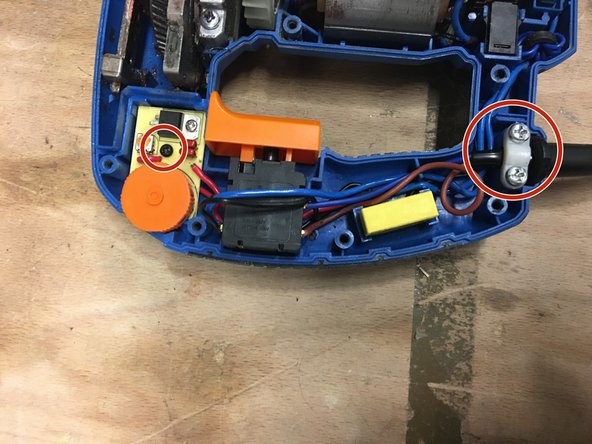
      • Remove the two screws to unlock the cable.

      Ask FixBot

      Add Comment

    5. Dexter 750W Wired Jigsaw Power Cable Replacement: step 5, image 1 of 1
      • Remove the black screw, in order to remove the wheel.

      Ask FixBot

      Add Comment

      • Thanks to a screwdriver, leverage to be able to recover the wheel.

      Ask FixBot

      Add Comment

    6. Dexter 750W Wired Jigsaw Power Cable Replacement: step 7, image 1 of 2 Dexter 750W Wired Jigsaw Power Cable Replacement: step 7, image 2 of 2
      • Turn the switch over.

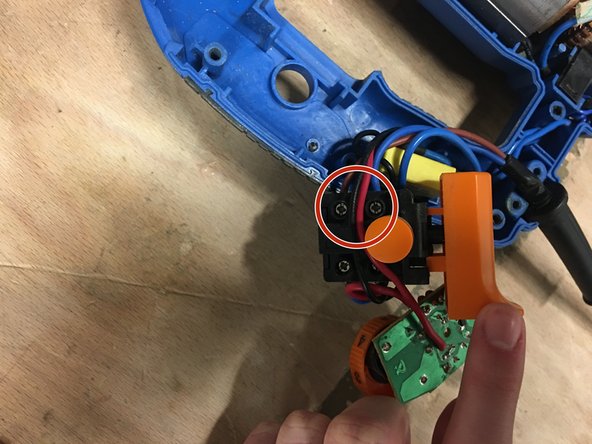
      • Unscrew the 2 screws to remove the blue and brown cables.

      Ask FixBot

      Add Comment

    7. Dexter 750W Wired Jigsaw Power Cable Replacement: step 8, image 1 of 1
      • Reconnect the new cable.

      • The brown thread must be at the top and the blue thread must be at the bottom.

      Ask FixBot

      Add Comment

    8. Dexter 750W Wired Jigsaw Power Cable Replacement: step 9, image 1 of 2 Dexter 750W Wired Jigsaw Power Cable Replacement: step 9, image 2 of 2
      • Reposition each room in its housing.

      • Then screw each screw.

      Ask FixBot

      Add Comment

    9. Dexter 750W Wired Jigsaw Power Cable Replacement: step 10, image 1 of 1
      • Close and screw the device.

      Ask FixBot

      Add Comment

Finish Line

Cancel: I did not complete this guide.

Special thanks to these translators:

fr en

100%

HelloMacOS is helping us fix the world! Want to contribute?
Start translating ›

Céline Chemineau

Member since: 01/29/20

17,052 Reputation

95 Guides authored

Team

Leroy Merlin Member of Leroy Merlin

Community

39 Members

1,632 Guides authored

0 Guide Comments

Add Comment

View Statistics:

Past 24 Hours: 2

Past 7 Days: 13

Past 30 Days: 58

All Time: 612