Free Shipping on Domestic Orders $75+

This translation was generated by a machine and has not been reviewed by a person yet. Speak this language? Review it.

Dexter 750W Corded Jigsaw Motor Replacement

What you need

    1. Dexter 750W Corded Jigsaw Motor Replacement, Unplug: step 1, image 1 of 1
      • Before you begin, remember to unplug the socket from the mains.

      Ask FixBot

      Add Comment

    2. Dexter 750W Corded Jigsaw Motor Replacement: step 2, image 1 of 1
      • Remove the vacuum adapter from the back of the device.

      Ask FixBot

      Add Comment

    3. Dexter 750W Corded Jigsaw Motor Replacement: step 3, image 1 of 2 Dexter 750W Corded Jigsaw Motor Replacement: step 3, image 2 of 2
      • Using a screwdriver or screwdriver, unscrew and open the device.

      • Unlock the tray by lifting the lever.

      Ask FixBot

      Add Comment

      • Use needle nose pliers and remove the clip located next to the blade holder.

      Ask FixBot

      Add Comment

      • Remove the blade holder, keeping the slider at the end of the holder.

      Ask FixBot

      Add Comment

    4. Dexter 750W Corded Jigsaw Motor Replacement: step 6, image 1 of 1
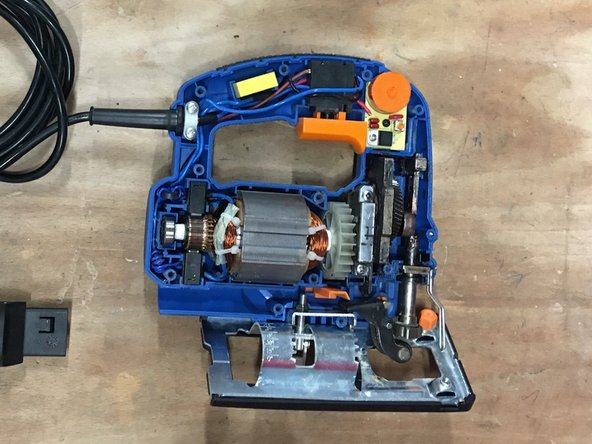
      • Unscrew the two screws and set them aside.

      Ask FixBot

      Add Comment

      • Remove the two carbons located next to the stator.

      Ask FixBot

      Add Comment

      • Lift the stator, then, levering as you go, pull the motor out.

      Ask FixBot

      Add Comment

    5. Dexter 750W Corded Jigsaw Motor Replacement: step 9, image 1 of 1
      • Put the new motor back in its place.

      Ask FixBot

      Add Comment

    6. Dexter 750W Corded Jigsaw Motor Replacement: step 10, image 1 of 2 Dexter 750W Corded Jigsaw Motor Replacement: step 10, image 2 of 2
      • Collect the end cap on the old engine.

      • Put it back on the new motor.

      • Put some grease on the tip.

      Ask FixBot

      Add Comment

    7. Dexter 750W Corded Jigsaw Motor Replacement: step 11, image 1 of 1
      • Replace the two screws to stabilize the motor.

      Ask FixBot

      Add Comment

      • Return the blade holder to its location.

      • Make sure you put each piece in its place.

      Ask FixBot

      Add Comment

      • Replace the staple in the same location. The curved side of the staple should go to the rounded side of the bracket.

      • Lubricate the whole.

      • Make sure you put each piece in its place.

      Ask FixBot

      Add Comment

    8. Dexter 750W Corded Jigsaw Motor Replacement: step 14, image 1 of 2 Dexter 750W Corded Jigsaw Motor Replacement: step 14, image 2 of 2
      • Put the coals back in their places.

      Ask FixBot

      Add Comment

    9. Dexter 750W Corded Jigsaw Motor Replacement: step 15, image 1 of 1
      • Before closing, lubricate each gear.

      Ask FixBot

      Add Comment

    10. Dexter 750W Corded Jigsaw Motor Replacement: step 16, image 1 of 1
      • Close and screw the device.

      Ask FixBot

      Add Comment

Conclusion

follow guide through or in reverse to reassemble

Cancel: I did not complete this guide.

Special thanks to these translators:

fr en

100%

HelloMacOS is helping us fix the world! Want to contribute?
Start translating ›

Céline Chemineau

Member since: 01/29/20

17,052 Reputation

95 Guides authored

Team

Leroy Merlin Member of Leroy Merlin

Community

39 Members

1,632 Guides authored

0 Guide Comments

Add Comment

View Statistics:

Past 24 Hours: 8

Past 7 Days: 23

Past 30 Days: 88

All Time: 1,090