Dexcom G6 Receiver Speaker Replacement

What you need

  1. Dexcom G6 Receiver Speaker Replacement, Display and Front Bezel: step 1, image 1 of 1
    • Unscrew the 6 Torx T5 screws from the back of the device

  2. Dexcom G6 Receiver Speaker Replacement: step 2, image 1 of 2 Dexcom G6 Receiver Speaker Replacement: step 2, image 2 of 2
    • Use a spudger to lift up the screen assembly ribbon cable flap, then remove the ribbon cable.

    • Screen Information: Model AM0310R-04 Lot # NHT18080052

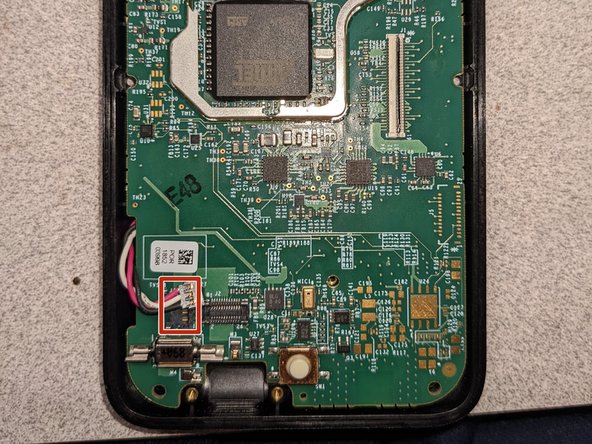
  3. Dexcom G6 Receiver Speaker Replacement, Charging Port: step 3, image 1 of 1
    • Using a spudger, unplug the Charging Port connector from the motherboard.

  4. Dexcom G6 Receiver Speaker Replacement: step 4, image 1 of 1
    • Remove the 2 silver Torx T5 screws holding the charging port down.

  5. Dexcom G6 Receiver Speaker Replacement: step 5, image 1 of 1
    • Remove the Charging Port Assembly from the motherboard.

  6. Dexcom G6 Receiver Speaker Replacement, Motherboard: step 6, image 1 of 1
    • Remove the silver Torx T5 screw holding the motherboard down.

  7. Dexcom G6 Receiver Speaker Replacement: step 7, image 1 of 2 Dexcom G6 Receiver Speaker Replacement: step 7, image 2 of 2
    • Using a spudger, carefully remove the battery connector on the left side of the motherboard.

  8. Dexcom G6 Receiver Speaker Replacement: step 8, image 1 of 1
    • Using a spudger, carefully pry up the motherboard to remove it.

  9. Dexcom G6 Receiver Speaker Replacement, Speaker: step 9, image 1 of 1
    • Using a spudger, carefully pry up and remove the speaker at the top.

    • Remove any remaining adhesive.

    • Put down new adhesive tape(be careful not to let it get in the way of the speaker).

    • Stick the new speaker down.

Conclusion

To reassemble your device, follow these instructions in reverse order.

Andrew S

Member since: 07/30/21

15,453 Reputation

8 Guides authored

0 Guide Comments

Add Comment

View Statistics:

Past 24 Hours: 0

Past 7 Days: 0

Past 30 Days: 3

All Time: 235