Free Shipping on Domestic Orders $75+

Dell Vostro V13 RAM Replacement

What you need

    1. Dell Vostro V13 RAM Replacement, Back Cover: step 1, image 1 of 3 Dell Vostro V13 RAM Replacement, Back Cover: step 1, image 2 of 3 Dell Vostro V13 RAM Replacement, Back Cover: step 1, image 3 of 3
      • Back up the memory to an external drive and power off the laptop before starting.

      • Flip the laptop over so the vents are facing you.

      • Remove the six 5.0 mm Phillips #1 screws using the magnetic driver.

      • Remove the two 5.0 mm Phillips #1 screws on the back side of the laptop.

      Ask FixBot

      Add Comment

    2. Dell Vostro V13 RAM Replacement: step 2, image 1 of 3 Dell Vostro V13 RAM Replacement: step 2, image 2 of 3 Dell Vostro V13 RAM Replacement: step 2, image 3 of 3
      • Slide out the SD and MicroSD holders.

      • If you are having trouble sliding them out, use the plastic opening tool.

      Ask FixBot

      Add Comment

    3. Dell Vostro V13 RAM Replacement: step 3, image 1 of 3 Dell Vostro V13 RAM Replacement: step 3, image 2 of 3 Dell Vostro V13 RAM Replacement: step 3, image 3 of 3
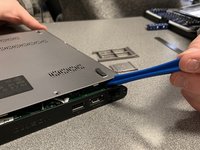
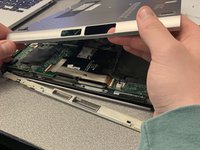
      • Slide the plastic opening tool around the perimeter of the laptop until the cover pops off.

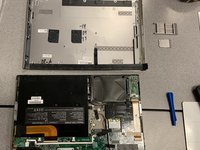
      • Pull the back cover off.

      Ask FixBot

      Add Comment

    4. Dell Vostro V13 RAM Replacement: step 4, image 1 of 2 Dell Vostro V13 RAM Replacement: step 4, image 2 of 2
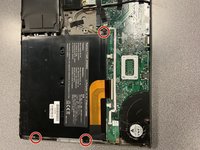
      • Remove the three black 3.9 mm Phillips #1 screws holding the battery in place.

      Ask FixBot

      Add Comment

    5. Dell Vostro V13 RAM Replacement: step 5, image 1 of 3 Dell Vostro V13 RAM Replacement: step 5, image 2 of 3 Dell Vostro V13 RAM Replacement: step 5, image 3 of 3
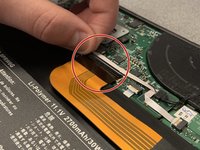
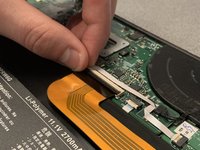
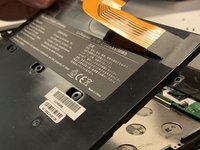
      • Flip up the clip of the ribbon connector.

      • Pull the strip out to disconnect the battery.

      Ask FixBot

      Add Comment

    6. Dell Vostro V13 RAM Replacement: step 6, image 1 of 2 Dell Vostro V13 RAM Replacement: step 6, image 2 of 2
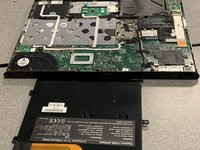
      • Remove the battery.

      • Removing the battery allows you to work safely.

      Ask FixBot

      Add Comment

    1. Dell Vostro V13 RAM Replacement, RAM: step 7, image 1 of 3 Dell Vostro V13 RAM Replacement, RAM: step 7, image 2 of 3 Dell Vostro V13 RAM Replacement, RAM: step 7, image 3 of 3
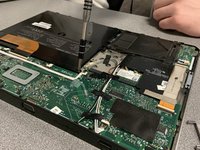
      • Open the laptop.

      • Wedge the plastic opening tool around the seam of the notification panel to loosen it.

      Ask FixBot

      Add Comment

    2. Dell Vostro V13 RAM Replacement: step 8, image 1 of 3 Dell Vostro V13 RAM Replacement: step 8, image 2 of 3 Dell Vostro V13 RAM Replacement: step 8, image 3 of 3
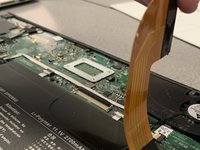
      • Disconnect the ribbon connector by using the plastic opening tool.

      Ask FixBot

      Add Comment

    3. Dell Vostro V13 RAM Replacement: step 9, image 1 of 1
      • Remove the panel to reveal the RAM.

      Ask FixBot

      Add Comment

    4. Dell Vostro V13 RAM Replacement: step 10, image 1 of 2 Dell Vostro V13 RAM Replacement: step 10, image 2 of 2
      • Push the two black/silver clips in to dislodge the RAM.

      • If you're having trouble, use the plastic opening tool to push the clips in.

      Ask FixBot

      Add Comment

    5. Dell Vostro V13 RAM Replacement: step 11, image 1 of 2 Dell Vostro V13 RAM Replacement: step 11, image 2 of 2
      • Remove the RAM.

      Ask FixBot

      Add Comment

Conclusion

To reassemble your device, follow these instructions in reverse order.

Cancel: I did not complete this guide.

0 Guide Comments

Add Comment

View Statistics:

Past 24 Hours: 0

Past 7 Days: 9

Past 30 Days: 28

All Time: 2,612