What you need
-
-
-
Slide the battery release latch into the unlock position.
-
Remove the battery from the system.
 Ask FixBot
-
-
-
-
-
Remove the screws that secure the base cover to the computer.
-
Press the rubber feet towards the rear of the system to disengage the bottom door.
-
Remove the base cover from the computer.
-
-
-
-
-
-
Remove the screws securing the hard drive bracket in place.
-
Remove the screw securing the hard drive latch in place
-
Slide the hard drive release latch into the unlock position.
-
-
-
Remove the hard drive bracket from the system.
-
Flex the hard drive bracket outward and press the hard drive upwards from the bottom.
-
Remove the hard drive from the hard drive bracket.
-
-


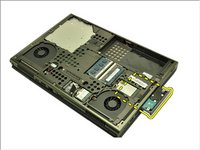


To reassemble your device, follow these instructions in reverse order.
Cancel: I did not complete this guide.
6 other people completed this guide.


