Introduction
If your Dell Latitude 3150 becomes slow, unresponsive, or jitters unexpectedly, it might be time to replace the RAM. Random-access memory (RAM) is a crucial part of the device that allows quick access and short-term storage. Replacing it yourself is an affordable option and can be done quickly with the right tools and careful handling.
What you need
-
-
-
Remove the seven 5 mm screws using a Phillips #1 screwdriver.
-
Pry the back open with a plastic opening tool, working around the edges until all the retaining clips are disengaged.
 Ask FixBot
-
-
-
-
Remove the two Phillips 3 mm screws connected to the battery using a Phillips #1 screwdriver.
-
Carefully lift the battery and unplug the battery cable from the device.
-
Remove the battery from the laptop.
-
-
-
-
-
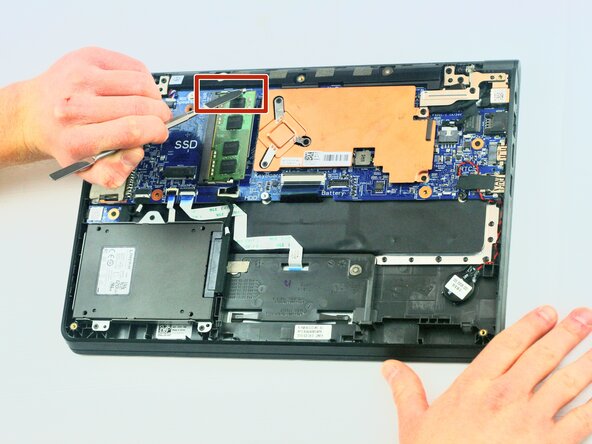
Using the metal spudger, push the pins on the sides of the RAM out.
-
The RAM will pop out; carefully remove it from the laptop.
-
-




To reassemble your device, follow these instructions in reverse order.
Cancel: I did not complete this guide.
One other person completed this guide.

Team

Texas Tech, Team 2-3, Johansen Fall 2025 Member of Texas Tech, Team 2-3, Johansen Fall 2025
TTU-JOHANSEN-F25S2G3
5 Members
60 Guides authored
