Introduction
If your Dell Latitude 3150 keyboard is unresponsive, has stuck or missing keys, or is otherwise malfunctioning, it might be time for a replacement. The keyboard is one of the most frequently used components, and even minor issues can interrupt your workflow. Replacing it yourself is a cost-effective solution and can be done quickly with the right tools and careful handling.
Before starting, make sure you have a compatible keyboard designed for the Dell Latitude 3150, as an incorrect model may not fit or work properly.
What you need
-
-
-
Remove the seven 5 mm screws using a Phillips #1 screwdriver.
-
Pry the back open with a plastic opening tool, working around the edges until all the retaining clips are disengaged.
 Ask FixBot
-
-
-
Remove the two Phillips 3 mm screws connected to the battery using a Phillips #1 screwdriver.
-
Carefully lift the battery and unplug the battery cable from the device.
-
Remove the battery from the laptop.
-
-
-
-
-
-
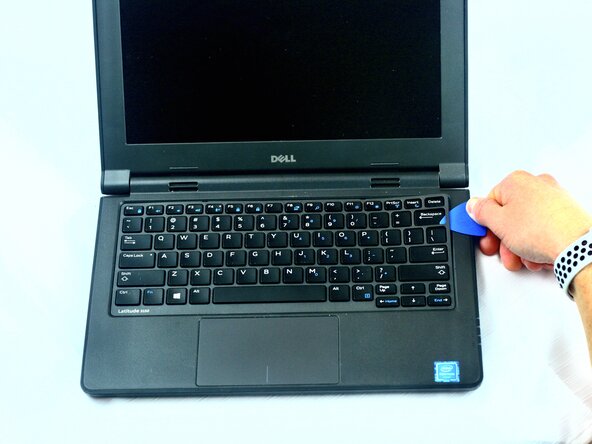
Using an opening pick, carefully pry up and unsnap the keyboard bezel.
-
-
-
Using the metal spudger, lift the safety clip and gently disconnect the keyboard cable connector.
-
-




To reassemble your device, follow these instructions in reverse order.

Team

Texas Tech, Team 2-3, Johansen Fall 2025 Member of Texas Tech, Team 2-3, Johansen Fall 2025
TTU-JOHANSEN-F25S2G3
5 Members
60 Guides authored
