Free Shipping on Domestic Orders $75+

Dell Inspiron M5110 Module Cover Replacement

Prerequisite Only
This is a prerequisite-only guide! This guide is part of another procedure and isn’t meant to be used alone.

What you need

    1. Dell Inspiron M5110 Module Cover  Replacement, Battery: step 1, image 1 of 1
      • Shut down the computer and turn it upside down.

      Ask FixBot

      Add Comment

    2. Dell Inspiron M5110 Module Cover  Replacement: step 2, image 1 of 1
      • Slide both of the battery release latches on the bottom of the device in towards the center of the computer.

      Ask FixBot

      Add Comment

    3. Dell Inspiron M5110 Module Cover  Replacement: step 3, image 1 of 1
      • Slide and lift the battery up and out from the device.

      Ask FixBot

      Add Comment

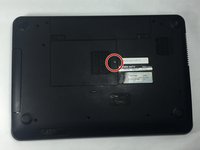
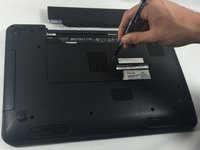
    1. Dell Inspiron M5110 Module Cover  Replacement, Module Cover: step 4, image 1 of 2 Dell Inspiron M5110 Module Cover  Replacement, Module Cover: step 4, image 2 of 2
      • Remove the 5 mm Phillips # 0 screw in the middle of the device.

      Ask FixBot

      Add Comment

    2. Dell Inspiron M5110 Module Cover  Replacement: step 5, image 1 of 1
      • Remove the module cover pressing in the release tabs and pulling the cover up and away from the base of the device.

      Ask FixBot

      Add Comment

Conclusion

To reassemble your device, follow these instructions in reverse order.

Cancel: I did not complete this guide.

Cody Flynn

Member since: 10/18/16

334 Reputation

4 Guides authored

Team

UMass Dartmouth, Team 4-3, Catania Fall 2016 Member of UMass Dartmouth, Team 4-3, Catania Fall 2016

UMASSD-CATANIA-F16S4G3

3 Members

96 Guides authored

0 Guide Comments

Add Comment

View Statistics:

Past 24 Hours: 1

Past 7 Days: 5

Past 30 Days: 16

All Time: 210