Free Shipping on Domestic Orders $75+

Dell Inspiron 7568 Display Assembly Replacement Guide

What you need

    1. Dell Inspiron 7568 Display Assembly Replacement Guide, Battery: step 1, image 1 of 2 Dell Inspiron 7568 Display Assembly Replacement Guide, Battery: step 1, image 2 of 2
      • Remove the ten 7mm Phillips #1 screws on the bottom cover.

      • Remove the bottom cover.

      Ask FixBot

      Add Comment

    2. Dell Inspiron 7568 Display Assembly Replacement Guide: step 2, image 1 of 2 Dell Inspiron 7568 Display Assembly Replacement Guide: step 2, image 2 of 2
      • Remove the four 3mm Phillips #1 screws holding the battery.

      • Unhinge the connector cable to the battery.

      • Remove the battery.

      Ask FixBot

      Add Comment

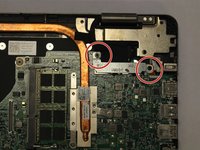
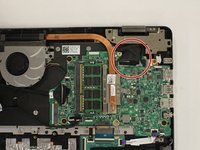
    1. Dell Inspiron 7568 Display Assembly Replacement Guide, Display Assembly: step 3, image 1 of 2 Dell Inspiron 7568 Display Assembly Replacement Guide, Display Assembly: step 3, image 2 of 2
      • Unscrew & remove the two 3mm screws (using a ph1 screwdriver bit) and the cable bracket, above the motherboard

      • Doing this will allow one to access the LCD-motherboard connector cables.

      Ask FixBot

      Add Comment

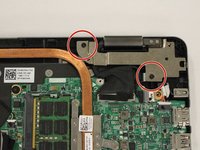
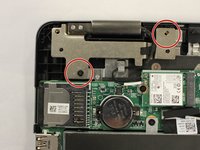
    2. Dell Inspiron 7568 Display Assembly Replacement Guide: step 4, image 1 of 2 Dell Inspiron 7568 Display Assembly Replacement Guide: step 4, image 2 of 2
      • Unscrew the 7mm screws that secure the left and right hinges (using a ph1 screwdriver bit).

      Ask FixBot

      Add Comment

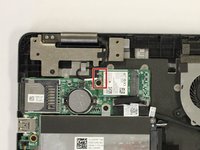
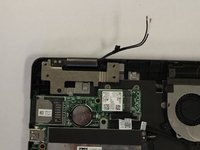
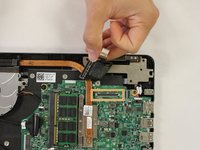
    3. Dell Inspiron 7568 Display Assembly Replacement Guide: step 5, image 1 of 3 Dell Inspiron 7568 Display Assembly Replacement Guide: step 5, image 2 of 3 Dell Inspiron 7568 Display Assembly Replacement Guide: step 5, image 3 of 3
      • Disconnect the antenna cable (under the left hinge)

      • Disconnect the LCD and Touchscreen display cables under the right hinge.

      • These are a set of two cables. For better image see image two in step one of this guide.

      Ask FixBot

      Add Comment

    4. Dell Inspiron 7568 Display Assembly Replacement Guide: step 6, image 1 of 1
      • Carefully separate the screen from the bottom half of the device.

      Ask FixBot

      Add Comment

Conclusion

To reassemble your device, follow these instructions in reverse order.

Cancel: I did not complete this guide.

2 other people completed this guide.

Yash Samant

Member since: 02/22/17

406 Reputation

3 Guides authored

Team

USF Tampa, Team S2-G2, Lacy Spring 2017 Member of USF Tampa, Team S2-G2, Lacy Spring 2017

USFT-LACY-S17S2G2

4 Members

35 Guides authored

0 Guide Comments

Add Comment

View Statistics:

Past 24 Hours: 1

Past 7 Days: 9

Past 30 Days: 34

All Time: 1,307