
Dell Inspiron 17-5749 RAM Replacement

Christopher Tran and
Last updated on Feb 21, 2020
Views: 875
View statistics:
- Past 24 Hours:
- 2
- Past 7 Days:
- 10
- Past 30 Days:
- 45
- All Time:
- 875
Comments: 0
No one has left comments on this guide. Will you be first?
Go to guide commentsCompleted: 0 1
No one has marked this guide "completed." Will you be the first?
1 person has marked this guide "completed." It's you — great job!
Favorites: 0 1
No one has favorited (and subscribed to) this guide. Will you be the first?
1 person has favorited (and subscribed to) this guide — and that's you!
Action Shots
Be an action hero! This guide needs images that better demonstrate how to perform specific actions.
Introduction
Go to step 1 ↓This guide will take you through the steps to replace your RAM. Make sure you are working in an un-carpeted area so you will not shock your laptop components. Before starting make sure to completely turn off your laptop and unplug it from any power source.
What you need
Tools


-
-
Tool used on this step:Anti-Static Wrist Strap$7.95
-
Turn off power to the laptop.
-
Unplug the charging cable from the laptop.
 Ask FixBot
-
-
-
Switch each of the battery latches to the "unlocked" position.
-
Pull battery upwards by the tab to remove from the laptop.
-
-
-
-
-
-
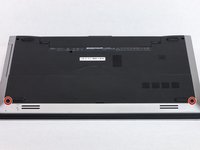
Remove the two 5.5mm screws that secure the base cover to the computer's base.
-
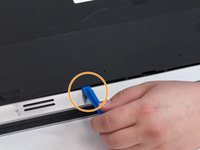
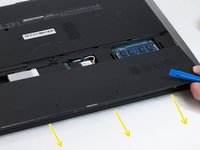
Using the plastic opening tool, carefully pry open the base cover starting from the center.
-
Lift the base cover upwards to remove and set it aside.
-
-
-
-
-
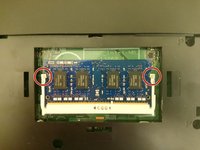
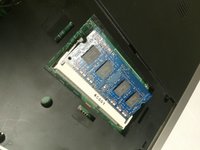
Using your fingertips, spread apart the securing clips on each end of the memory-module slot until the memory module pops up.
-
Slide the memory module away from the memory-module slot.
-
-




To reassemble your device, follow these instructions in reverse order.

Team

Washington State, Team S1-G2, Lobnitz Spring 2018 Member of Washington State, Team S1-G2, Lobnitz Spring 2018
WSU-LOBNITZ-S18S1G2
6 Members
144 Guides authored
