
Dell Inspiron 15 Memory Module Replacement

Terrence15 and one other contributor
Last updated on Jul 11, 2018
Views: 1.3K
View statistics:
- Past 24 Hours:
- 2
- Past 7 Days:
- 24
- Past 30 Days:
- 65
- All Time:
- 1,258
Comments: 0
No one has left comments on this guide. Will you be first?
Go to guide commentsCompleted: 1 2
1 person has marked this guide "completed." Will you be next?
2 people have marked this guide "completed." Including you — great job!
Favorites: 0 1
No one has favorited (and subscribed to) this guide. Will you be the first?
1 person has favorited (and subscribed to) this guide — and that's you!
Community-Contributed Guide
An awesome member of our community made this guide. It was not created by iFixit staff.
Introduction
Go to step 1 ↓In this guide, we will be showing you how to remove and replace the Memory Module.
-
-
-
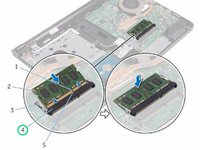
Using your fingertips, spread apart the securing clips at each end of the memory-module slot until the memory module pops up.
 Ask FixBot
-
-
-
Slide and remove the memory module from the memory-module slot.
-
-
-
-
Align the notch on the NEW memory module with the tab on the memory-module slot.
-
-
-
Slide the memory module firmly into the slot at an angle and press the memory module down until it clicks into place.
-
-


Cancel: I did not complete this guide.
One other person completed this guide.


