Shop the Holiday Gift Guide
Free Shipping on Domestic Orders $75+

Dell Inspiron 15 3559 Memory Module Replacement

Views: 1K

View statistics:

Past 24 Hours:
1
Past 7 Days:
9
Past 30 Days:
48
All Time:
1,019
Comments: 0

No one has left comments on this guide. Will you be first?

Go to guide comments
Completed: 0

No one has marked this guide "completed." Will you be the first?

Favorites: 0

No one has favorited (and subscribed to) this guide. Will you be the first?

Time Required: 25 - 50 seconds
Difficulty: Very easy
Community-Contributed Guide

An awesome member of our community made this guide. It was not created by iFixit staff.

Dell Inspiron 15 3559 Memory Module Replacement

Introduction

Go to step 1 ↓

In this guide, we will be showing you how to remove and replace the Hard Drive.

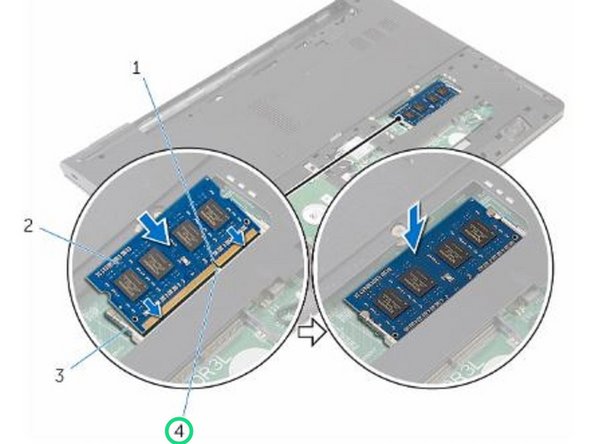
    1. Dell Inspiron 15 3559 Memory Module Replacement, Popping up the Memory Module: step 1, image 1 of 2 Dell Inspiron 15 3559 Memory Module Replacement, Popping up the Memory Module: step 1, image 2 of 2
      • WARNING: Before working inside your computer, read the safety information that shipped with your computer and follow the steps in Before Working Inside Your Computer. After working inside your computer, follow the instructions in After Working Inside Your Computer.

      • Using your fingertips, pry apart the securing clips on each end of the memory-module slot until the memory module pops up.

      Ask FixBot

      Add Comment

    2. Dell Inspiron 15 3559 Memory Module Replacement, Removing the Memory Module: step 2, image 1 of 1
      • Slide and remove the memory module from the memory-module slot.

      Ask FixBot

      Add Comment

    3. Dell Inspiron 15 3559 Memory Module Replacement, Align the Notch: step 3, image 1 of 2 Dell Inspiron 15 3559 Memory Module Replacement, Align the Notch: step 3, image 2 of 2
      • Align the notch on the NEW memory module with the tab on the memory-module slot.

      Ask FixBot

      Add Comment

    4. Dell Inspiron 15 3559 Memory Module Replacement, Sliding the Memory Module: step 4, image 1 of 1
      • Slide the memory module firmly into the slot at an angle and press the memory module down until it clicks into place.

      • NOTE: If you do not hear the click, remove the memory module and reinstall it.

      Ask FixBot

      Add Comment

Finish Line

Cancel: I did not complete this guide.

Author

with

Terrence15

Member since: 12/18/17

80,173 Reputation

441 Guides authored

Team

RampUP America, Inc. Member of RampUP America, Inc.

Community

45 Members

12,349 Guides authored

0 Guide Comments

Add Comment

View Statistics:

Past 24 Hours: 1

Past 7 Days: 9

Past 30 Days: 48

All Time: 1,019