Introduction
In this guide, we will show you how to remove and replace the Solid-State Drive.
What you need
-
-
-
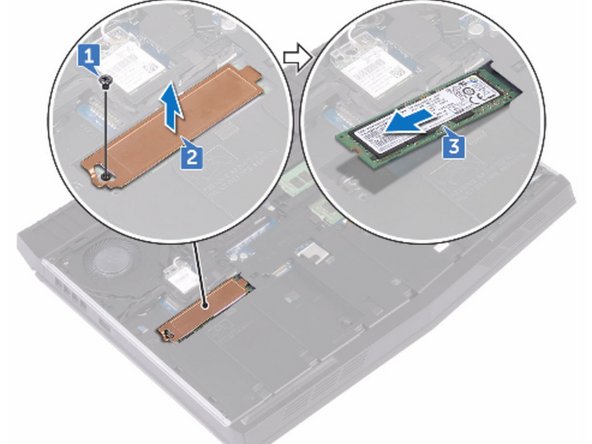
Remove the screw (M2x3) that secures the solid-state drive shield and solid- state drive to the computer base.
 Ask FixBot
-
-
-
Peel off the solid-state drive shield from the solid-state drive.
-
-
-
Slide and remove the solid-state drive from the solid-state drive slot.
-
-
-
-
Align the notch on the solid-state drive with the tab on the solid-state drive slot.
-
-
-
Slide the solid-state drive into the solid-state drive slot.
-
-
-
Slide and adhere the solid-state drive shield on the NEW solid-state drive.
-
-
-
Replace the screw (M2x3) that secures the solid-state drive and solid-state drive shield to the computer base.
-
-


Conclusion
To reassemble your device, follow these instructions in reverse order.


