Free Shipping on Domestic Orders $75+

DJI Phantom 4 Advanced Remote Controller Battery Replacement

What you need

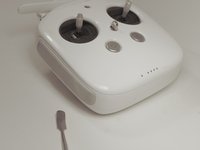
    1. DJI Phantom 4 Advanced Remote Controller Battery Replacement, Back Panel: step 1, image 1 of 1
      • Remove the four screws with a Torx T8 screwdriver to access the back con board.

      Ask FixBot

      Add Comment

    2. DJI Phantom 4 Advanced Remote Controller Battery Replacement: step 2, image 1 of 2 DJI Phantom 4 Advanced Remote Controller Battery Replacement: step 2, image 2 of 2
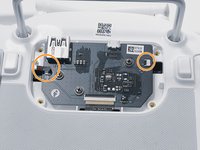
      • Remove three screws using a Phillips #00 screwdriver.

      Ask FixBot

      Add Comment

    3. DJI Phantom 4 Advanced Remote Controller Battery Replacement: step 3, image 1 of 2 DJI Phantom 4 Advanced Remote Controller Battery Replacement: step 3, image 2 of 2
      Tool used on this step:
      Tweezers
      $4.99
      Buy
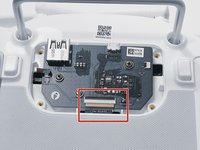
      • With tweezers, gently remove the large con board tab.

      • Use your hands to remove the two small clips. Pull out from the socket, in a horizontal direction.

      Ask FixBot

      Add Comment

    4. DJI Phantom 4 Advanced Remote Controller Battery Replacement: step 4, image 1 of 2 DJI Phantom 4 Advanced Remote Controller Battery Replacement: step 4, image 2 of 2
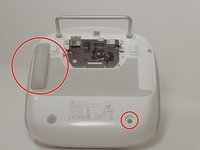
      • Peel off the rubber grips to access the screw holes.

      • Make sure to save your grips and do not to get them stuck to anything, you are going to want to save the adhesive.

      • Remove the back board and set it aside.

      Ask FixBot

      Add Comment

    5. DJI Phantom 4 Advanced Remote Controller Battery Replacement: step 5, image 1 of 2 DJI Phantom 4 Advanced Remote Controller Battery Replacement: step 5, image 2 of 2
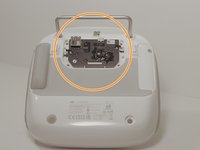
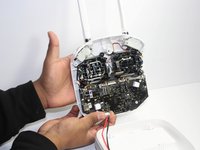
      • Pull apart the back plastic panel.

      • Recommended tool for this would be the metal spudger, but not required.

      • Once the back panel is off, you will have access to the motherboard.

      Ask FixBot

      Add Comment

    1. DJI Phantom 4 Advanced Remote Controller Battery Replacement, Battery: step 6, image 1 of 1
      • The battery is attached to the back plastic, and is towards the bottom of the remote.

      • Unplug the cord that is connected to the bottom of the main board.

      Ask FixBot

      Add Comment

    2. DJI Phantom 4 Advanced Remote Controller Battery Replacement: step 7, image 1 of 1
      • After the cord is unplugged, remove the battery by lifting upon the plastic cover, which the battery is attached to.

      Ask FixBot

      Add Comment

    3. DJI Phantom 4 Advanced Remote Controller Battery Replacement: step 8, image 1 of 1
      • Once the cover is off you can access the battery.

      Ask FixBot

      Add Comment

Conclusion

To reassemble your device, follow these instructions in reverse order.

Cancel: I did not complete this guide.

10 other people completed this guide.

4 Guide Comments

Grrrrrreat Job!

Rick Artman - Reply Share

Wo kann ich den Akku bestellen? Danke für die Hilfe!

Xl S - Reply Share

does someone know where to buy the akku?

Xl S - Reply Share

Ich habe ein Erzatz Akku eingesetzt mit den gleichen Strom Werten, beim aufladen stelle ich fest das der Akku nicht ladet..

Es blinkt bloß ( schnell) auf einer LED.

Wo kann die Ursache liegen.

Matthias Meier - Reply Share

Add Comment

View Statistics:

Past 24 Hours: 3

Past 7 Days: 32

Past 30 Days: 162

All Time: 16,061