
Cosori TurboBlaze Control Panel Replacement

Ismael Martinez Castillo and one other contributor
Last updated on Dec 19, 2024
Views: 1.8K
View statistics:
- Past 24 Hours:
- 5
- Past 7 Days:
- 65
- Past 30 Days:
- 211
- All Time:
- 1,805
Comments: 1
1 comment on steps.
Completed: 1 2
1 person has marked this guide "completed." Will you be next?
2 people have marked this guide "completed." Including you — great job!
Favorites: 0 1
No one has favorited (and subscribed to) this guide. Will you be the first?
1 person has favorited (and subscribed to) this guide — and that's you!
Introduction
Go to step 1 ↓Is your Cosori TurboBlaze not properly heating your food? Is it not displaying the correct temperature on your control panel's display? If this is the case, then you can fix this issue with the replacement of your control panel's microprocessor inside the the main circuit board.
What you need
Tools


-
-
-
Use an iFixit opening tool to pry open the top lid of your air fryer.
 Ask FixBot
-
-
-
-
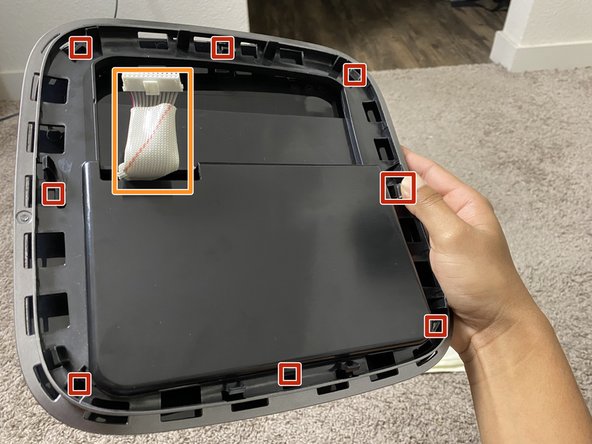
Gently push each small translucent button inward.
-
Pull the white wire harness through.
-
-
-
Remove four 1.2 mm screws from the control panel using a Phillips #1 screwdriver.
-
-
-
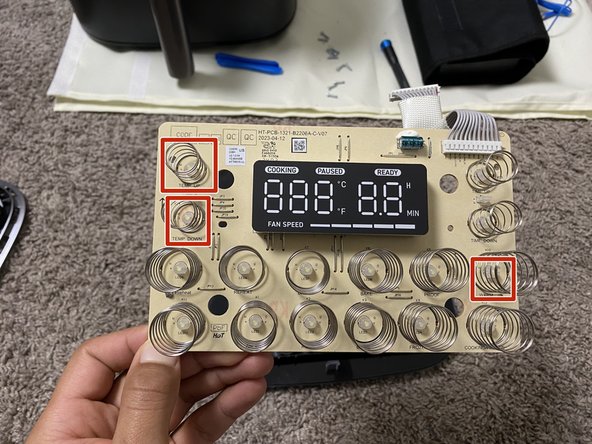
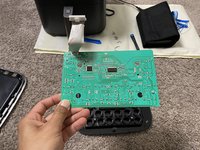
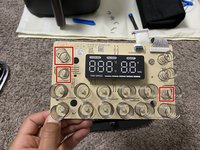
Flip the circuit board over to its backside to access the input controls.
-
If any input controls show signs of wear, cuts, or bends, then they must be replaced.
-
-




To reassemble your device, follow these instructions in reverse order.
Cancel: I did not complete this guide.
One other person completed this guide.

Team

CSU Sacramento, Team 2-2, Laflen Fall 2024 Member of CSU Sacramento, Team 2-2, Laflen Fall 2024
CSUSAC-LAFLEN-F24S2G2
1 Member
12 Guides authored
