
HP Envy x360 m6-aq105dx Audio Jack Replacement

Cory Smith and 4 other contributors
Last updated on Jun 3, 2020
Views: 790
View statistics:
- Past 24 Hours:
- 2
- Past 7 Days:
- 10
- Past 30 Days:
- 53
- All Time:
- 790
Comments: 1
1 comment on steps.
Completed: 0 1
No one has marked this guide "completed." Will you be the first?
1 person has marked this guide "completed." It's you — great job!
Favorites: 0 1
No one has favorited (and subscribed to) this guide. Will you be the first?
1 person has favorited (and subscribed to) this guide — and that's you!
Introduction
Go to step 1 ↓This piece of the device is responsible for the connection between headphones and the computer. If this piece of the device isn’t working, then it isn’t possible to hear sound from the laptop unless it is playing out loud from the speakers. This guide will show how to replace a faulty Audio Jack.
What you need
Tools


-
-
-
Remove the two 7.8 mm screws using the Phillips #0 screwdriver.
-
Remove the six 5.2 mm screws using the Torx T5 screwdriver.
 Ask FixBot
-
-
-
Insert the Jimmy in between the frame of the laptop and the removable back cover and remove the back cover from the device.
-
-
-
-
-
Remove the two 4.6 mm screws using the Phillips #0 screwdriver.
-
Remove the one 4.4mm screw using the Phillips #0 screwdriver.
-
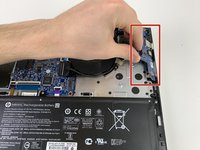
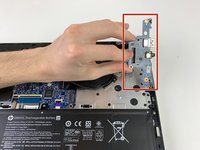
Remove the one 2.8mm screws securing the audio jack/power button board using the Phillips #0 screwdriver.
-
-
-
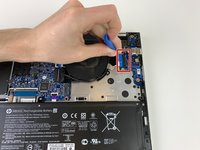
Place the blue plastic opening tool on top of the blue data ribbon and under the connector. Lift up on the blue plastic opening tool to open the connector.
-
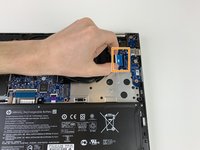
Remove the blue data ribbon from the audio board.
-
-
-




To reassemble your device, follow these instructions in reverse order.

Team

Embry-Riddle Aeronautical University, Team S6-G3, Rauch Spring 2020 Member of Embry-Riddle Aeronautical University, Team S6-G3, Rauch Spring 2020
ERAU-RAUCH-S20S6G3
4 Members
72 Guides authored
