Introduction
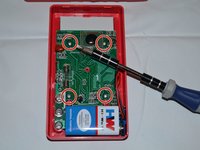
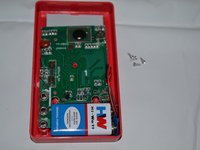
In order to remove and replace the circuit board, the back panel must first be removed by taking out the two screws on the back of the device. To reduce the chances of damaging the meter, remove the battery as soon as the back cover is removed. Next, the four screws that secure the circuit board must be removed. This will free the circuit board to be removed and replaced.
What you need
-
-
-
Place the meter face down, and the back panel and screws can be seen.
 Ask FixBot
-
-
-
Unscrew the two 9mm screws on the back panel using a #0 Phillips screwdriver.
-
-
-
-
Remove the back panel of the device by lifting upward.
-
Remove the battery from the meter before continuing.
-
-
-
Remove the four 7mm Phillips screws holding the circuit board in place.
-
-
-
Gently lift the circuit board away from the device casing.
-
-



To reassemble your device, follow these instructions in reverse order.
Cancel: I did not complete this guide.
6 other people completed this guide.

Team

Clemson, Team 2-4, Benson Fall 2014 Member of Clemson, Team 2-4, Benson Fall 2014
CLEM-BENSON-F14S2G4
4 Members
72 Guides authored
1 Guide Comment
What is the little dial on the circuit board on the upper right that has numbers 1 through 3 on it and it can be adjusted thank you
