Free Shipping on Domestic Orders $75+

Cen-Tech Seven Function Digital Multimeter Ball Bearings Replacement

What you need

    1. Cen-Tech Seven Function Digital Multimeter Ball Bearings Replacement, Position Device: step 1, image 1 of 1
      • Place the meter face down, and the back panel and screws can be seen.

      Ask FixBot

      Add Comment

    2. Cen-Tech Seven Function Digital Multimeter Ball Bearings Replacement, Remove Back Panel Screws: step 2, image 1 of 2 Cen-Tech Seven Function Digital Multimeter Ball Bearings Replacement, Remove Back Panel Screws: step 2, image 2 of 2
      • Unscrew the two 9mm screws on the back panel using a #0 Phillips screwdriver.

      Ask FixBot

      Add Comment

    3. Cen-Tech Seven Function Digital Multimeter Ball Bearings Replacement, Remove Back Panel: step 3, image 1 of 1
      • Remove the back panel of the device by lifting upward.

      • Remove the battery from the meter before continuing.

      Ask FixBot

      Add Comment

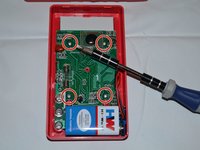
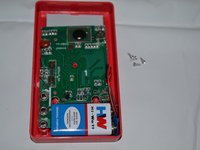
    4. Cen-Tech Seven Function Digital Multimeter Ball Bearings Replacement, Unscrew Motherboard: step 4, image 1 of 2 Cen-Tech Seven Function Digital Multimeter Ball Bearings Replacement, Unscrew Motherboard: step 4, image 2 of 2
      • Remove the four 7mm Phillips screws holding the circuit board in place.

      Ask FixBot

      Add Comment

    5. Cen-Tech Seven Function Digital Multimeter Ball Bearings Replacement, Remove Motherboard: step 5, image 1 of 1
      • Gently lift the circuit board away from the device casing.

      • Remove the battery after removing the back cover to reduce the chances of short-circuiting the circuit board.

      Ask FixBot

      Add Comment

    1. Cen-Tech Seven Function Digital Multimeter Ball Bearings Replacement, Locate Dial: step 6, image 1 of 1
      • The dial is located in the central part of the device.

      Ask FixBot

      Add Comment

    2. Cen-Tech Seven Function Digital Multimeter Ball Bearings Replacement, Remove Dial: step 7, image 1 of 1
      • Carefully remove dial from device by lifting upward.

      • Clean existing dial or replace if necessary.

      • Take care not to lose the small ball bearings.

      Ask FixBot

      Add Comment

    1. Cen-Tech Seven Function Digital Multimeter Ball Bearings Replacement, Locate and Remove Ball Bearings: step 8, image 1 of 1
      • Locate ball bearings. Carefully remove.

      • If both ball bearings are still present, try lubricating ball bearings with multi-use lubricant.

      • If one or both ball bearings are missing, simply replace.

      Ask FixBot

      Add Comment

Conclusion

To reassemble your device, follow these instructions in reverse order.

Cancel: I did not complete this guide.

4 other people completed this guide.

Anna Kihm

Member since: 10/13/14

965 Reputation

5 Guides authored

Team

Clemson, Team 2-4, Benson Fall 2014 Member of Clemson, Team 2-4, Benson Fall 2014

CLEM-BENSON-F14S2G4

4 Members

24 Guides authored

0 Guide Comments

Add Comment

View Statistics:

Past 24 Hours: 0

Past 7 Days: 9

Past 30 Days: 26

All Time: 2,813