15% Off Selected iFixit Tools — Limited Time
Free Shipping on Domestic Orders $75+

Canon PowerShot SD1000 Shutter Button Replacement

What you need

  1. Canon PowerShot SD1000 Shutter Button Replacement, Back Panel: step 1, image 1 of 2 Canon PowerShot SD1000 Shutter Button Replacement, Back Panel: step 1, image 2 of 2
    • Remove the two 2.9 mm screws from the side panel closest to the camera lens.

    Ask FixBot

    Add Comment

  2. Canon PowerShot SD1000 Shutter Button Replacement: step 2, image 1 of 1
    • Remove the two 2.9 mm screws from the camera bottom panel.

    Ask FixBot

    Add Comment

  3. Canon PowerShot SD1000 Shutter Button Replacement: step 3, image 1 of 1
    • Remove the two 2.9 mm screws from the side panel farthest from the lens.

    Ask FixBot

    Add Comment

  4. Canon PowerShot SD1000 Shutter Button Replacement: step 4, image 1 of 1
    • Pull the back panel away from the camera body, starting at the end with the function buttons.

    Ask FixBot

    Add Comment

  5. Canon PowerShot SD1000 Shutter Button Replacement: step 5, image 1 of 1
    • Remove the small cover panel and the attached wrist strap mount.

    Ask FixBot

    Add Comment

  6. Canon PowerShot SD1000 Shutter Button Replacement, Front Case: step 6, image 1 of 1
    • Remove the front cover by gently pulling it away from the camera body.

    Ask FixBot

    Add Comment

  7. Canon PowerShot SD1000 Shutter Button Replacement: step 7, image 1 of 1
    • Place the front cover, back cover, and wrist strap mount in a safe place until you are ready for reassembly.

    Ask FixBot

    Add Comment

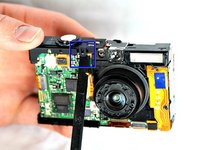
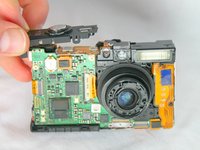
  8. Canon PowerShot SD1000 Shutter Button Replacement, Shutter Button: step 8, image 1 of 2 Canon PowerShot SD1000 Shutter Button Replacement, Shutter Button: step 8, image 2 of 2
    • Using the spudger, take off the shutter button by prying the small tab on the front side of the camera.

    Ask FixBot

    Add Comment

Conclusion

To reassemble your device, follow these instructions in reverse order.

Cancel: I did not complete this guide.

Phillip Phung

Member since: 01/19/12

666 Reputation

9 Guides authored

Team

Cal Poly, Team 8-18, Maness Winter 2012 Member of Cal Poly, Team 8-18, Maness Winter 2012

CPSU-MANESS-W12S8G18

4 Members

12 Guides authored

0 Guide Comments

Add Comment

View Statistics:

Past 24 Hours: 2

Past 7 Days: 7

Past 30 Days: 45

All Time: 1,585