Free Shipping on Domestic Orders $75+

Canon PowerShot ELPH 150 IS Back Plate/Menu Button Replacement

What you need

  1. Canon PowerShot ELPH 150 IS  Back Plate/Menu Button Replacement, Back Plate/Menu Buttons: step 1, image 1 of 2 Canon PowerShot ELPH 150 IS  Back Plate/Menu Button Replacement, Back Plate/Menu Buttons: step 1, image 2 of 2
    • Locate the ON/Off button on the top of the camera and hold it down until the screen and all lights on the camera go dark.

    Ask FixBot

    Add Comment

  2. Canon PowerShot ELPH 150 IS  Back Plate/Menu Button Replacement: step 2, image 1 of 1
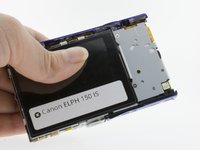
    • Locate the back plate of the camera (contains the LCD screen and menu buttons).

    Ask FixBot

    Add Comment

  3. Canon PowerShot ELPH 150 IS  Back Plate/Menu Button Replacement: step 3, image 1 of 2 Canon PowerShot ELPH 150 IS  Back Plate/Menu Button Replacement: step 3, image 2 of 2
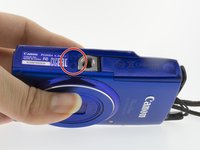
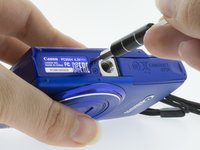
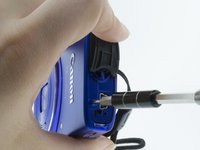
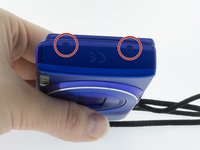
    • To remove the back plate you will need to unscrew the 6 support screws securing it to the camera.

    • Use a Phillips #00 screwdriver to remove the first 2 screws on the bottom of the camera.

    Ask FixBot

    Add Comment

  4. Canon PowerShot ELPH 150 IS  Back Plate/Menu Button Replacement: step 4, image 1 of 3 Canon PowerShot ELPH 150 IS  Back Plate/Menu Button Replacement: step 4, image 2 of 3 Canon PowerShot ELPH 150 IS  Back Plate/Menu Button Replacement: step 4, image 3 of 3
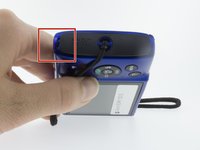
    • Remove the next 2 screws located behind the AV port using the same Phillips #00 screwdriver.

    Ask FixBot

    Add Comment

  5. Canon PowerShot ELPH 150 IS  Back Plate/Menu Button Replacement: step 5, image 1 of 2 Canon PowerShot ELPH 150 IS  Back Plate/Menu Button Replacement: step 5, image 2 of 2
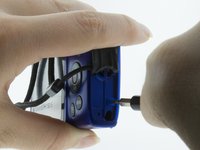
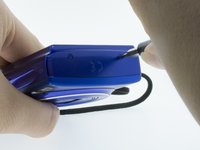
    • Use a Phillips #00 screwdriver to remove the final 2 screws from the blue side panel.

    Ask FixBot

    Add Comment

  6. Canon PowerShot ELPH 150 IS  Back Plate/Menu Button Replacement: step 6, image 1 of 3 Canon PowerShot ELPH 150 IS  Back Plate/Menu Button Replacement: step 6, image 2 of 3 Canon PowerShot ELPH 150 IS  Back Plate/Menu Button Replacement: step 6, image 3 of 3
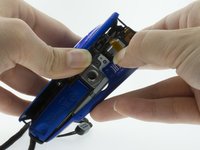
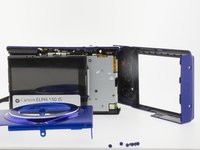
    • Use your hands or a spudger to gently pry the front and back case apart along the seams on the bottom of the camera.

    • Completely remove the back plate.

    Ask FixBot

    Add Comment

Conclusion

To reassemble your device, follow these instructions in reverse order.

Cancel: I did not complete this guide.

One other person completed this guide.

Alex Larrimore

Member since: 03/05/17

350 Reputation

3 Guides authored

0 Guide Comments

Add Comment

View Statistics:

Past 24 Hours: 3

Past 7 Days: 6

Past 30 Days: 20

All Time: 818