Free Shipping on Domestic Orders $75+

Canon EOS Rebel T2i Main PCB Board Replacement

Views: 812

View statistics:

Past 24 Hours:
3
Past 7 Days:
27
Past 30 Days:
95
All Time:
812
Comments: 2

2 guide comments.

Go to guide comments
Completed: 0

No one has marked this guide "completed." Will you be the first?

Favorites: 0

No one has favorited (and subscribed to) this guide. Will you be the first?

Time Required: 30 minutes
Difficulty: Moderate
Community-Contributed Guide

An awesome member of our community made this guide. It was not created by iFixit staff.

Canon EOS Rebel T2i Main PCB Board Replacement

Introduction

Go to step 1 ↓

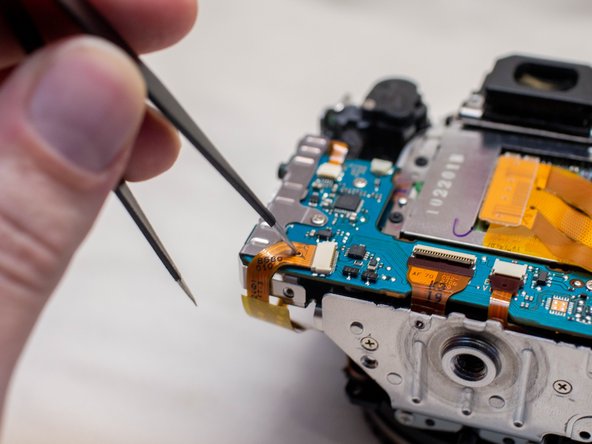
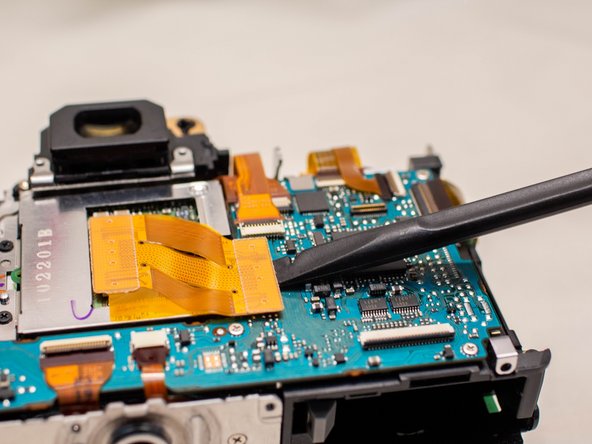
This guide shows you how to remove the main PCB board in the camera. This is useful in the event that the main PCB board is damaged and needs to be replaced, or if you need to access other parts such as the SD card board, or the imaging sensor.

When you install the new main PCB board and are reconnecting the cables, note the single round black cable that leads to the top cover. This cable connects to the right side of the board and the connector is attached to the back of the board. To reconnect it, you simply need to push the cable down into the hole on the connector.

This cable is a fiber optics cable used for the camera flash. Forgetting to reconnect this cable will likely cause the camera flash to no longer function.

The Phillips #000 screwdriver is marked as an optional tool as you can always use the JIS #000 screwdriver in its place (JIS screwdrivers won't damage Phillips head screws).

What you need

Tools

    1. Canon EOS Rebel T2i Main PCB Board Replacement, I/F Terminal Cover: step 1, image 1 of 3 Canon EOS Rebel T2i Main PCB Board Replacement, I/F Terminal Cover: step 1, image 2 of 3 Canon EOS Rebel T2i Main PCB Board Replacement, I/F Terminal Cover: step 1, image 3 of 3
      • Before beginning, ensure that the camera is off, and the battery is removed.

      • Pry open the rubber I/F terminal cap with your finger.

      • Remove the two M1.7x2.5mm JIS #000 screws that are underneath the I/F terminal cap.

      • Using a plastic pick, or another thin plastic prying tool, pop off the I/F terminal cover from the camera.

      Ask FixBot

      Add Comment

    1. Canon EOS Rebel T2i Main PCB Board Replacement, Remove the back casing.: step 2, image 1 of 2 Canon EOS Rebel T2i Main PCB Board Replacement, Remove the back casing.: step 2, image 2 of 2
      • On the left side of the camera, remove the following screw:

      • One M1.7x6.0mm JIS #000 screw

      • On the right side, remove the following screws:

      • One M1.7x5.5mm JIS #000 screw

      • One M1.7x3.5mm JIS #000 screw

      Ask FixBot

      Add Comment

    2. Canon EOS Rebel T2i Main PCB Board Replacement: step 3, image 1 of 2 Canon EOS Rebel T2i Main PCB Board Replacement: step 3, image 2 of 2
      • Remove the battery door.

      • Open the battery door to about a 35° angle.

      • Pull the battery door straight outwards.

      • Remove the following screws from the bottom of the camera:

      • One M1.7x6.0mm JIS #000 screw

      • Two M1.7x2.5mm JIS #000 screws

      • One M1.7x5.5mm JIS #000 screw

      Ask FixBot

      Add Comment

    3. Canon EOS Rebel T2i Main PCB Board Replacement, Open the back panel.: step 4, image 1 of 3 Canon EOS Rebel T2i Main PCB Board Replacement, Open the back panel.: step 4, image 2 of 3 Canon EOS Rebel T2i Main PCB Board Replacement, Open the back panel.: step 4, image 3 of 3
      • Slide the viewfinder eyepiece vertically upwards.

      • Start to pull the back cover partially off of the camera.

      • Use caution when removing the back cover, there is a ribbon cable that connects the LCD screen to the main PCB board.

      • Disconnect the LCD screen ribbon cable from the main PCB board.

      • Use a plastic spudger to lift up the black locking tab.

      • Carefully pull out the ribbon cable from its connector using a pair of angled tweezers.

      • Finish pulling the back cover off of the camera body.

      Ask FixBot

      Add Comment

    1. Canon EOS Rebel T2i Main PCB Board Replacement, Front Cover: step 5, image 1 of 2 Canon EOS Rebel T2i Main PCB Board Replacement, Front Cover: step 5, image 2 of 2
      • Remove the following screws from the front of the camera:

      • Two M1.7x5.5mm JIS #000 screws

      • On the bottom of the camera, remove the following screws:

      • Three M1.7x5.5mm JIS #000 screws

      Ask FixBot

      Add Comment

    2. Canon EOS Rebel T2i Main PCB Board Replacement: step 6, image 1 of 3 Canon EOS Rebel T2i Main PCB Board Replacement: step 6, image 2 of 3 Canon EOS Rebel T2i Main PCB Board Replacement: step 6, image 3 of 3
      • Slide a spudger tool towards the tripod mount, underneath the plastic cover.

      • Push the plastic cover up and over the tripod mount.

      • Pull the front cover off of the camera.

      • Electric Shock Warning: With the front cover off, the high voltage capacitor on the DC PCB board is now exposed. It is recommended that you use a capacitor discharge tool to ensure the capacitor is fully discharged before proceeding further.

      Ask FixBot

      Add Comment

    1. Canon EOS Rebel T2i Main PCB Board Replacement, Top Casing: step 7, image 1 of 2 Canon EOS Rebel T2i Main PCB Board Replacement, Top Casing: step 7, image 2 of 2
      • Remove the screws next to the viewfinder:

      • Two M1.7x2.5mm JIS #000 screws

      • One M2.0x8.9mm JIS #000 diopter screw

      • Remove the following screws from the top of the camera:

      • One M1.7x2.5mm JIS #000 screw

      • One M1.7x5.0mm Phillips #000 screw

      Ask FixBot

      Add Comment

    2. Canon EOS Rebel T2i Main PCB Board Replacement: step 8, image 1 of 2 Canon EOS Rebel T2i Main PCB Board Replacement: step 8, image 2 of 2
      • Disconnect the microphone cable from the main PCB board.

      • Position a flathead 2.5mm screwdriver between the main PCB board connector and the microphone connector.

      • Gently wiggle the flathead screwdriver back and forth until the microphone connector comes free.

      • If you do not have a flathead 2.5mm screwdriver, another similarly sized flathead screwdriver should work.

      Ask FixBot

      Add Comment

    3. Canon EOS Rebel T2i Main PCB Board Replacement: step 9, image 1 of 3 Canon EOS Rebel T2i Main PCB Board Replacement: step 9, image 2 of 3 Canon EOS Rebel T2i Main PCB Board Replacement: step 9, image 3 of 3
      • Locate the ribbon cable which connects the top cover the main PCB board.

      • Use a plastic spudger tool to carefully pry off the connector.

      • Use caution when handling ribbon connectors and their connectors.

      • Take note of where this fiber optic cable connects to the main PCB board.

      • The cable will slide out of the connector when you pull the top cover off. You will need to remember to slide this cable back into the connector with a pair of tweezers when reinstalling the top cover. This cable is crucial for the function of the camera flash.

      Ask FixBot

      Add Comment

    4. Canon EOS Rebel T2i Main PCB Board Replacement: step 10, image 1 of 2 Canon EOS Rebel T2i Main PCB Board Replacement: step 10, image 2 of 2
      • Disconnect these two cables connected to the DC PCB board.

      • Use the same method as with removing the microphone cable, except with using a flathead 3.0mm screwdriver.

      • Gently wiggle the flathead screwdriver back and forth until the connectors comes free.

      • If you do not have a flathead 3.0mm screwdriver, another slightly larger flathead screwdriver should work.

      • Gently lift the top cover up and off of the camera body, being careful that the loose cables do not snag on anything.

      Ask FixBot

      Add Comment

    1. Canon EOS Rebel T2i Main PCB Board Replacement, Main PCB Board: step 11, image 1 of 3 Canon EOS Rebel T2i Main PCB Board Replacement, Main PCB Board: step 11, image 2 of 3 Canon EOS Rebel T2i Main PCB Board Replacement, Main PCB Board: step 11, image 3 of 3
      • Use caution while handling ribbon cables and ribbon cables connects to avoid damaging them.

      • Locate these three ribbon cables located on the left side of the main PCB board.

      • Disconnect the ribbon cables.

      • Two of these ribbon cables features a hole in them which can assist with disconnecting them. Use either a pair of tweezers or another tool with a thin point to pull out the ribbon cables utilizing this hole.

      • Use a plastic spudger tool to carefully push up and disconnect the imaging sensor ribbon cable.

      Ask FixBot

      Add Comment

    2. Canon EOS Rebel T2i Main PCB Board Replacement: step 12, image 1 of 1
      • Locate the remaining seven ribbon cables connected to the main PCB board.

      • Gently push up on the plastic lock tabs to unlock each of the ribbon cable connectors. Be especially careful with the wide lock tab, as it is particularly fragile.

      • Disconnect each ribbon cable from the main PCB board.

      • iFixit connector guide

      Ask FixBot

      Add Comment

    3. Canon EOS Rebel T2i Main PCB Board Replacement: step 13, image 1 of 2 Canon EOS Rebel T2i Main PCB Board Replacement: step 13, image 2 of 2
      • Remove the following screws on the main PCB board:

      • Three M1.7x2.5mm JIS #000 screws

      • Two M1.7x3.5mm Phillips #000 screws

      • Slide off the metal I/F terminal shield.

      Ask FixBot

      Add Comment

    4. Canon EOS Rebel T2i Main PCB Board Replacement: step 14, image 1 of 2 Canon EOS Rebel T2i Main PCB Board Replacement: step 14, image 2 of 2
      • Tilt the main PCB board upwards to reveal the remaining cable connection.

      • Carefully disconnect the cable.

      Ask FixBot

      Add Comment

Conclusion

To reassemble your device, follow these instructions in reverse order.

Cancel: I did not complete this guide.

Attached Documents

Zephosk

Member since: 09/26/24

6,209 Reputation

39 Guides authored

Team

LGBTQ Technicians Member of LGBTQ Technicians

Community

70 Members

852 Guides authored

2 Guide Comments

Hi! I'm looking to replace the Main PCB Board for my Canon EOS Rebel T2i. Do you know where I might be able to find one for sale?

Manuel - Reply Share

EBay is a pretty good place to check. You can probably just search Canon Rebel T2i motherboard to find some (or Canon 550D motherboard since it's the same camera). You might also be able to find one through just doing a Google search too. Though, with Google you might have better luck looking up the part number for the main PCB board, which is CG2-2749

Zephosk - Reply Share

Add Comment

View Statistics:

Past 24 Hours: 3

Past 7 Days: 27

Past 30 Days: 95

All Time: 812