Free Shipping on Domestic Orders $75+

Canon EOS Rebel G Lens Connector Replacement

Views: 2.4K

View statistics:

Past 24 Hours:
2
Past 7 Days:
17
Past 30 Days:
96
All Time:
2,430
Comments: 0

No one has left comments on this guide. Will you be first?

Go to guide comments
Completed: 2

2 people have marked this guide "completed." Will you be next?

Favorites: 0

No one has favorited (and subscribed to) this guide. Will you be the first?

Time Required: 5 - 10 minutes
Difficulty: Moderate
Featured Guide

This guide has been found to be exceptionally cool by the iFixit staff.

Canon EOS Rebel G Lens Connector Replacement

Introduction

Go to step 1 ↓

This guide shows you how to install a new lens connector.

What you need

Tools

  • Phillips #00 Screwdriver
    4.9
  • Spudger
    4.9
    1. Canon EOS Rebel G Lens Connector Replacement, Front Panel: step 1, image 1 of 1
      • Using a #00 Phillips screw driver, remove three 4.4 mm Phillips screws as indicated by the red circles.

      Ask FixBot

      Add Comment

    2. Canon EOS Rebel G Lens Connector Replacement: step 2, image 1 of 2 Canon EOS Rebel G Lens Connector Replacement: step 2, image 2 of 2
      • Using your finger, peel back the textured grip so the components are separated.

      Ask FixBot

      Add Comment

    3. Canon EOS Rebel G Lens Connector Replacement: step 3, image 1 of 3 Canon EOS Rebel G Lens Connector Replacement: step 3, image 2 of 3 Canon EOS Rebel G Lens Connector Replacement: step 3, image 3 of 3
      • Using the flat end of a spudger, loosen the connection between the front panel and the device.

      • Remove the front panel using your hands.

      Ask FixBot

      Add Comment

    1. Canon EOS Rebel G Lens Connector Replacement, Lens Connector: step 4, image 1 of 1
      • Using a Phillips #00 screwdriver, remove the 5 indicated screws

      • Five 6.2 mm Phillips screws

      Ask FixBot

      Add Comment

    2. Canon EOS Rebel G Lens Connector Replacement: step 5, image 1 of 1
      • Using your hands, remove the top black ring.

      • WARNING! The indicated piece is spring loaded. Prepare for it to eject when taking off top ring.

      • Spring located here.

      Ask FixBot

      Add Comment

    3. Canon EOS Rebel G Lens Connector Replacement: step 6, image 1 of 2 Canon EOS Rebel G Lens Connector Replacement: step 6, image 2 of 2
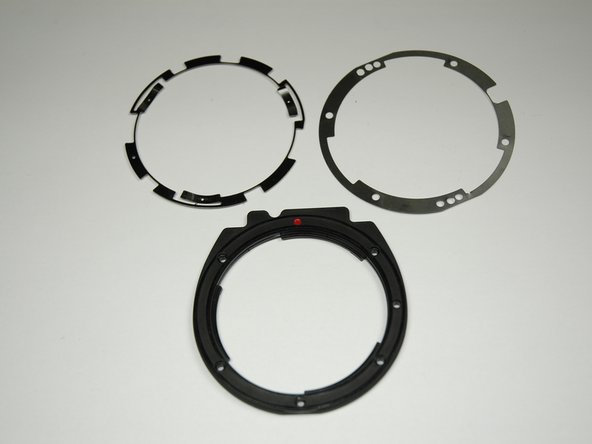
      • There are two silver metal rings.

      • Remove the top silver metal ring.

      Ask FixBot

      Add Comment

    4. Canon EOS Rebel G Lens Connector Replacement: step 7, image 1 of 1
      • Remove the bottom silver ring.

      Ask FixBot

      Add Comment

Conclusion

To reassemble your device, follow these instructions in reverse order.

Cancel: I did not complete this guide.

2 other people completed this guide.

Zach

Member since: 04/04/12

46 Reputation

8 Guides authored

Team

Cal Poly, Team 14-9, Forte Spring 2012 Member of Cal Poly, Team 14-9, Forte Spring 2012

CPSU-FORTE-S12S14G9

5 Members

144 Guides authored

0 Guide Comments

Add Comment

View Statistics:

Past 24 Hours: 2

Past 7 Days: 17

Past 30 Days: 96

All Time: 2,430