Free Shipping on Domestic Orders $75+

why! W840xx Battery replacement

Archived Guide
This guide is retained solely for historical purposes. Use the updated version of the guide to perform your repair.
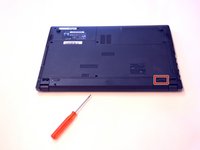
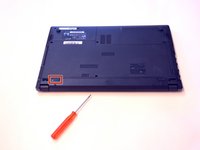
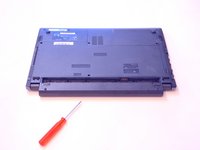
  1. why! W840xx Battery replacement, Battery: step 1, image 1 of 3 why! W840xx Battery replacement, Battery: step 1, image 2 of 3 why! W840xx Battery replacement, Battery: step 1, image 3 of 3
    • Open the latch on the right side that secures the battery in place.

    • Open the latch on the left side that secures the battery in place.

    • Now remove the battery.

    Ask FixBot
Conclusion

To put the device back together, follow these steps in reverse order.

Special thanks to these translators:

de en

100%

Alex Niculescu is helping us fix the world! Want to contribute?
Start translating ›

Felice Suglia

Member since: 06/15/13

33,562 Reputation

283 Guides authored

0 Guide Comments

Add Comment

View Statistics:

Past 24 Hours: 3

Past 7 Days: 12

Past 30 Days: 69

All Time: 269