
CMF Phone 2 Pro Screen Replacment

Madra1 and one other contributor
Last updated on Oct 16, 2025
Views: 3.2K
View statistics:
- Past 24 Hours:
- 15
- Past 7 Days:
- 104
- Past 30 Days:
- 349
- All Time:
- 3,209
Comments: 0
No one has left comments on this guide. Will you be first?
Go to guide commentsCompleted: 2 3
2 people have marked this guide "completed." Will you be next?
3 people have marked this guide "completed." Including you — great job!
Favorites: 0 1
No one has favorited (and subscribed to) this guide. Will you be the first?
1 person has favorited (and subscribed to) this guide — and that's you!
Community-Contributed Guide
An awesome member of our community made this guide. It was not created by iFixit staff.
Introduction
Go to step 1 ↓So I had to replace my screen on my CMF phone 2 pro. I could not find any documentation on how to do it or any videos so I just winged it. Appologies in advanced for not taking pictures or a video
This video gives a good idea of the teardown and how to remove the battery etc.
-
-
-
First take the SIM card tray out, then you must take the back off the phone by unscrewing all the screws around the case. The case then is removed using a shim to unclip the back by moving around the phone and peeling the back off.
-
Once the back of the phone is off, there is a plastic piece, which i believe houses the NFC and flashlight, take all the screws out of this and dont forget the screw under the white sticker.
-
Remove the battery and the plastic sheet underneath
-
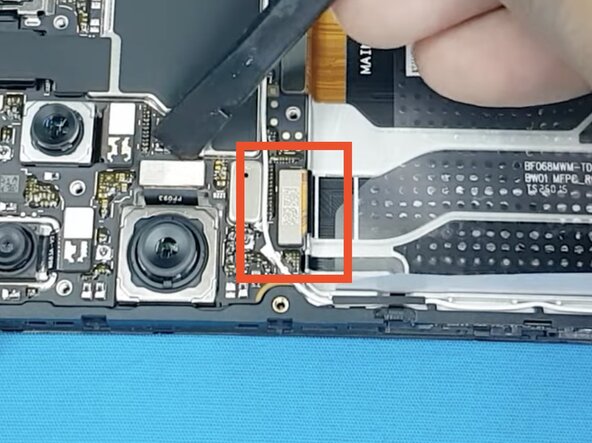
Disconnect the screen ribbon cable highlighted in the picture and prepare to feed this through the phone during the next step:
-
Once this is disconnected you can then do the normal screen replacement process, heat the screen edges and slowly pry the screen off. Its very straight forward once you have disconnected the Ribbon cable
-
Clean up the edges and replace with the new screen and follow the process in reverse.
 Ask FixBot
-
-
-
To reassemble your device, follow these instructions in reverse order.
Cancel: I did not complete this guide.
2 other people completed this guide.

