This translation was generated by a machine and has not been reviewed by a person yet. Speak this language? Review it.
Introduction
This guide explains how to replace or upgrade the memory of the Let's note CF-SX2.
What you need
-
-
-
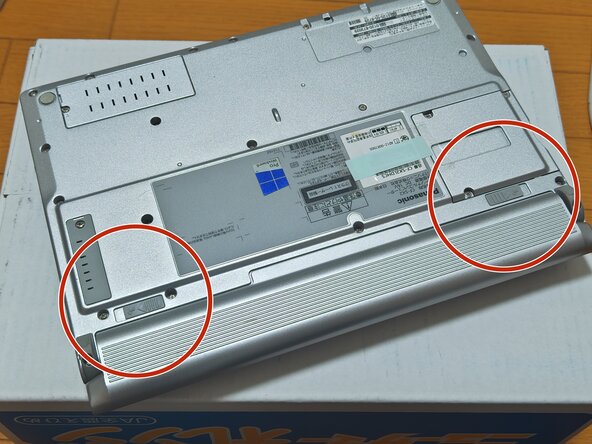
There are locks on the left and right sides of the battery.
-
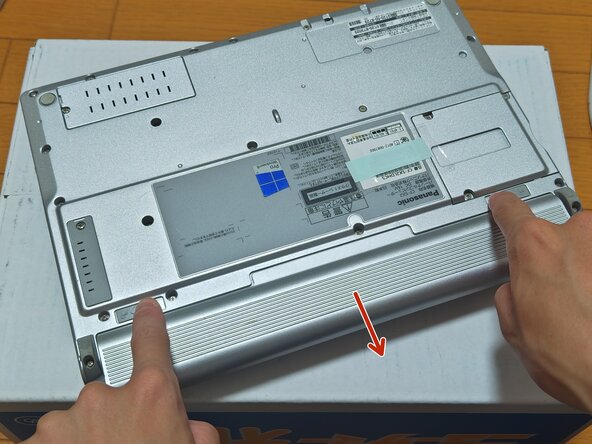
Slide them outward at the same time.
-
While holding them slid outward, push the battery out in the direction of the arrow.
 Ask FixBot
-
-
-
Make sure the battery is completely removed.
-
-
-
-
There is a screw at the marked position. You can turn it with a Phillips screwdriver.
-
Once the screw is removed, take off the cover.
-
There are clips, so please insert a thin tool in the direction of the arrow to remove it.
-
-
-
Once the cover is removed, you will have access to the RAM.
-
Push the metal clips on both sides of the RAM outward.
-
The RAM will unlock and can now be removed.
-
Once unlocked, pull the RAM in the direction of the arrow.
-
After replacing or upgrading the RAM, follow the previous steps in reverse to reassemble the device.
-
You have successfully completed the procedure.
-
-


To perform reassembly of your device, follow these steps in reverse order.

