
Brother CS6000i Body Replacement

Ava Martinez and 4 other contributors
Last updated on Dec 31, 2024
Views: 2.2K
View statistics:
- Past 24 Hours:
- 8
- Past 7 Days:
- 42
- Past 30 Days:
- 204
- All Time:
- 2,199
Comments: 0
No one has left comments on this guide. Will you be first?
Go to guide commentsCompleted: 1 2
1 person has marked this guide "completed." Will you be next?
2 people have marked this guide "completed." Including you — great job!
Favorites: 0 1
No one has favorited (and subscribed to) this guide. Will you be the first?
1 person has favorited (and subscribed to) this guide — and that's you!
Introduction
Go to step 1 ↓If your Brother CS6000i sewing machine is having any issues internally, it requires the body of the machine to be removed to repair any issue. This guide provides all the information on what screws to remove in order to open up the sewing machine.
This guide will act as a prerequisite to the majority of the Brother CS6000i guides.
Before beginning on this replacement guide, make sure that the Brother CS6000i is completely disconnected from any power source.
What you need
Tools

-
-
-
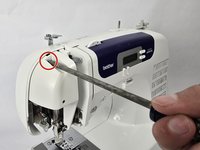
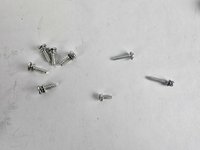
Remove the five 20 mm Phillips #2 screws on the back of the device.
-
Remove the single 28 mm Phillips #2 screw on the back of the device.
-
Remove the single 23 mm Phillips #2 screw on the back of the device.
 Ask FixBot
-
-
-
-
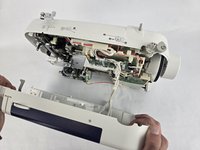
Slightly pull apart the two halves of the machine, taking care not to strain the attached cables.
-
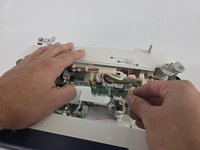
Unhook the white wires that are connected to the motherboard.
-
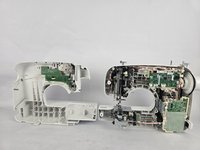
Fully separate the two halves.
-
-




To reassemble your device, follow these instructions in reverse order.
Cancel: I did not complete this guide.
One other person completed this guide.

Team

Cuesta, Team 20-1, Krynen Fall 2024 Member of Cuesta, Team 20-1, Krynen Fall 2024
CUESTA-KRYNEN-F24S20G1
5 Members
96 Guides authored
