Bowers and Wilkins T7 Battery Replacement

What you need

  1. Bowers and Wilkins T7 Battery Replacement, Access Panel: step 1, image 1 of 1
    • As with all electronic devices, make sure your device is powered off before you begin.

    • Gently lift up the access panel; it should easily "pop" open.

  2. Bowers and Wilkins T7 Battery Replacement: step 2, image 1 of 1
    • Remove 14mm screws on the front panel with a J1 Phillips head screwdriver.

    • There are 8 screws in total.

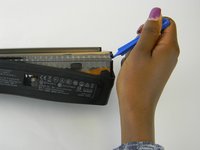
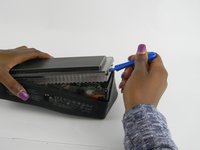
  3. Bowers and Wilkins T7 Battery Replacement: step 3, image 1 of 2 Bowers and Wilkins T7 Battery Replacement: step 3, image 2 of 2
    • Be gentle, the rubber seal is fragile and easy to tear, resulting in cosmetic damage to your device.

    • Using the ifixit Opening Tool, carefully pry off the rubber seal around the sides.

    • The seal is held by adhesive, if this is proving difficult you can use a heat gun to help the process.

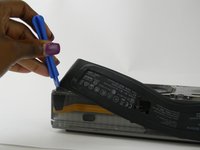
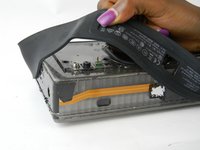
  4. Bowers and Wilkins T7 Battery Replacement: step 4, image 1 of 2 Bowers and Wilkins T7 Battery Replacement: step 4, image 2 of 2
    • The cover is the most difficult part to remove. As you work, pry continuously, moving the tool around the device, working it a little further as you go.

    • Using the ifixit Opening Tool, pry open at the seam found under the rubber seal.

    • As the cover starts to come off, you can lift up using your hand.

  5. Bowers and Wilkins T7 Battery Replacement: step 5, image 1 of 3 Bowers and Wilkins T7 Battery Replacement: step 5, image 2 of 3 Bowers and Wilkins T7 Battery Replacement: step 5, image 3 of 3
    Tool used on this step:
    Tweezers
    $4.99
    Buy
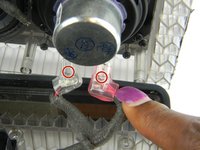
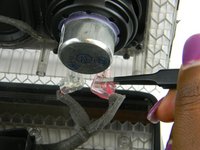
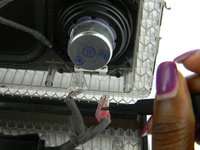
    • Gently squeeze the internal locking mechanism inside the red and white terminals with either your fingers or a pair of precision tweezers.

    • While squeezing the internal locking mechanism, pull back the terminal.

    • Repeat this process for the second speaker.

  6. Bowers and Wilkins T7 Battery Replacement, Battery: step 6, image 1 of 1
    • Using a cutting tool such as a Jimmy steel blade or wire cutter, cut the cable tie surrounding the battery.

    • Be careful not to damage the battery while cutting the cable tie surrounding the battery.

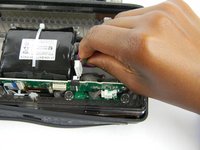
  7. Bowers and Wilkins T7 Battery Replacement: step 7, image 1 of 2 Bowers and Wilkins T7 Battery Replacement: step 7, image 2 of 2
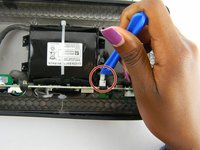
    • Using the ifixit Opening Tool, pry out the battery power supply connector.

    • Pull and remove the battery power supply connector.

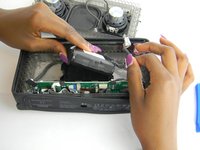
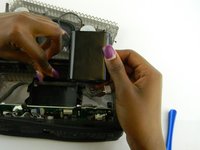
  8. Bowers and Wilkins T7 Battery Replacement: step 8, image 1 of 2 Bowers and Wilkins T7 Battery Replacement: step 8, image 2 of 2
    • After disconnecting the power supply connector, pull the battery out of its case.

Conclusion

To reassemble your device, follow these instructions in reverse order.

13 other people completed this guide.

Bertrand Plummer

Member since: 02/28/17

341 Reputation

1 Guide authored

Team

USF Tampa, Team S7-G1, Cagle Spring 2017 Member of USF Tampa, Team S7-G1, Cagle Spring 2017

USFT-CAGLE-S17S7G1

5 Members

7 Guides authored

4 Guide Comments

Bravo ! Le choix de cet appareil symbolique !

Pierre Vanhoorenbeeck - Reply

Seriously

Couldn't the lady get her

'nails did’

Lux Valet - Reply

No repair any repairing sentar

Abdul Malik Parvez - Reply

Brilliant instructions , thank you so much. Just dont worry about trying to remove the connectors for the speakers its too difficult ! and you risk damaging the wires - Just hope my new battery works when it comes from Amazon ! Greta speaker but had it replaced already under warranty due to the battery issue ! now same fault - hope it doesnt happen again but at least I know I can replace it myself now - thanks again

Jacqueline Banks - Reply

Add Comment

View Statistics:

Past 24 Hours: 3

Past 7 Days: 49

Past 30 Days: 175

All Time: 12,096