Bose Frames Alto Battery Replacement

What you need

  1. Bose Frames Alto Battery Replacement, Soften the Adhesive: step 1, image 1 of 1
    • Heat the left earpiece for three minutes on high with a hair dryer to soften the adhesive holding the cover. An iOpener or a heat gun on low heat can also be used.

  2. Bose Frames Alto Battery Replacement, Remove the Cover: step 2, image 1 of 2 Bose Frames Alto Battery Replacement, Remove the Cover: step 2, image 2 of 2
    • Insert a flat blade screwdriver between the hinge and the cover.

    • Use the hinge as a fulcrum to lever up the cover.

  3. Bose Frames Alto Battery Replacement: step 3, image 1 of 3 Bose Frames Alto Battery Replacement: step 3, image 2 of 3 Bose Frames Alto Battery Replacement: step 3, image 3 of 3
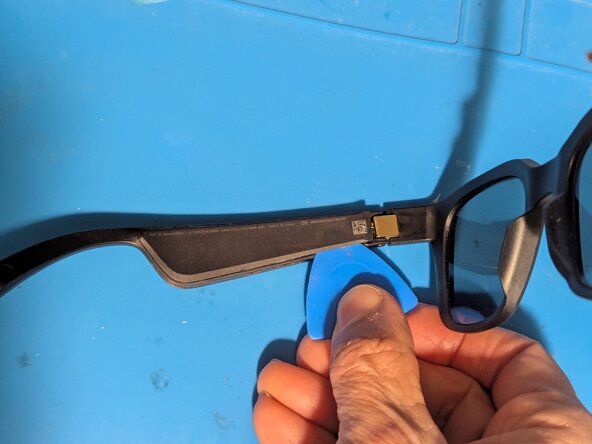
    • Insert an opening pick next to the hinge.

    • Slice the adhesive along the edge of the cover.

    • There is an internal protrusion at this point that will stop your pick.

    • Repeat for the opposite side.

  4. Bose Frames Alto Battery Replacement: step 4, image 1 of 2 Bose Frames Alto Battery Replacement: step 4, image 2 of 2
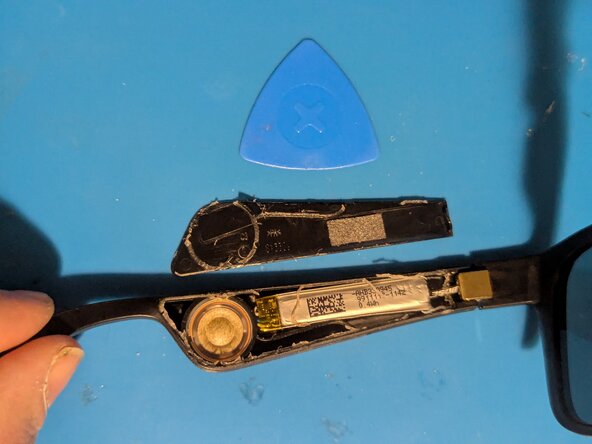
    • Remove the cover.

    • Clean the old adhesive from the earpiece and the cover.

  5. Bose Frames Alto Battery Replacement, Remove the Battery: step 5, image 1 of 2 Bose Frames Alto Battery Replacement, Remove the Battery: step 5, image 2 of 2
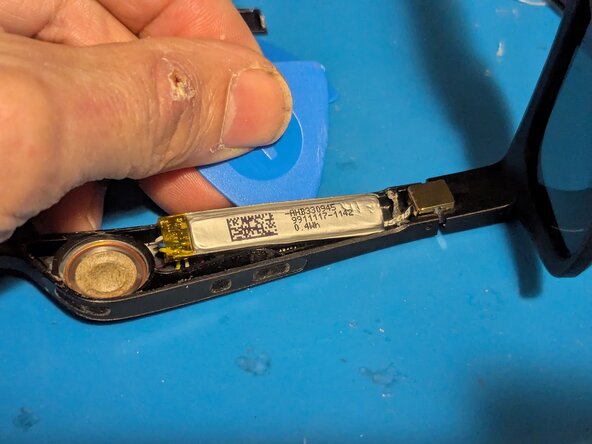
    • The battery is lightly adhered to the earpiece with double sided tape on the end next to the hinge. Pry it up with an opening pick.

    • Turn the battery over and fold it out of the way.

  6. Bose Frames Alto Battery Replacement: step 6, image 1 of 1
    • Note the positions of the wires in case your replacement battery doesn't use the same colors.

    • Yellow is the battery positive terminal (+)

    • White goes to the BMS board

    • Red is the speaker positive wire (+)

    • Black is the speaker negative wire (-)

    • Blue is battery negative (-)

  7. Bose Frames Alto Battery Replacement, Battery: step 7, image 1 of 3 Bose Frames Alto Battery Replacement, Battery: step 7, image 2 of 3 Bose Frames Alto Battery Replacement, Battery: step 7, image 3 of 3
    • Grasp the blue wire with tweezers then remove it with your soldering iron.

    • Repeat for the yellow wire.

    • And finally the white wire.

  8. Bose Frames Alto Battery Replacement: step 8, image 1 of 1
    • The battery has been removed.

    • For reassembly, add a piece of double sided tape to the end of the replacement battery next to the hinge.

Conclusion

To reassemble your device, follow these instructions in reverse order, gluing down the cover as the last step.

Jerry Wheeler

Member since: 03/21/22

83,671 Reputation

73 Guides authored

0 Guide Comments

Add Comment

View Statistics:

Past 24 Hours: 0

Past 7 Days: 9

Past 30 Days: 32

All Time: 32