Shop the Holiday Gift Guide
Free Shipping on Domestic Orders $75+

Bluetooth Ground Wire Shell Installation

Views: 78

View statistics:

Past 24 Hours:
0
Past 7 Days:
3
Past 30 Days:
12
All Time:
78
Comments: 0

No one has left comments on this guide. Will you be first?

Go to guide comments
Completed: 0

No one has marked this guide "completed." Will you be the first?

Favorites: 0

No one has favorited (and subscribed to) this guide. Will you be the first?

Time Required: No estimate
Difficulty: Moderate
Prerequisite Only

This is a prerequisite-only guide! This guide is part of another procedure and isn’t meant to be used alone.

Bluetooth Ground Wire Shell Installation

What you need

Parts

Tools

    1. Bluetooth Ground Wire Shell Installation, Put the ground wire shell into place: step 1, image 1 of 3 Bluetooth Ground Wire Shell Installation, Put the ground wire shell into place: step 1, image 2 of 3 Bluetooth Ground Wire Shell Installation, Put the ground wire shell into place: step 1, image 3 of 3
      • Slide the ground wire shell into its recess, making sure it goes under the microphone cables.

      Ask FixBot

      Add Comment

    2. Bluetooth Ground Wire Shell Installation, Install the ground wire shell screws: step 2, image 1 of 2 Bluetooth Ground Wire Shell Installation, Install the ground wire shell screws: step 2, image 2 of 2
      • You may need to push the ground wire under the lip of the cup to get its screw holes to line up.

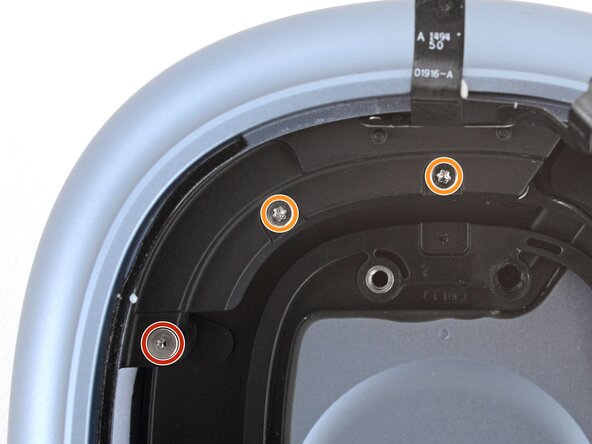
      • Install the five screws securing the ground wire shell:

      • One 11.8 mm‑long Torx Plus 2IP screw

      • Two 9.5 mm‑long Torx Plus 3IP screws

      • Two 10.6 mm‑long Torx Plus 3IP screws going into the side of the ear cup

      Ask FixBot

      Add Comment

    3. Bluetooth Ground Wire Shell Installation, Attach the microphone: step 3, image 1 of 2 Bluetooth Ground Wire Shell Installation, Attach the microphone: step 3, image 2 of 2
      • If any parts of the cable don't stay in place during the next three steps, use thin, double-sided tape to secure the cable.

      • Push the microphone cables into place on the ground wire shell, making sure the alignment holes go over their pegs.

      Ask FixBot

      Add Comment

    4. Bluetooth Ground Wire Shell Installation: step 4, image 1 of 2 Bluetooth Ground Wire Shell Installation: step 4, image 2 of 2
      • Use the point of a spudger to gently push the gold speaker contacts into its groove.

      Ask FixBot

      Add Comment

    5. Bluetooth Ground Wire Shell Installation: step 5, image 1 of 2 Bluetooth Ground Wire Shell Installation: step 5, image 2 of 2
      • Use a spudger or your fingers to gently push the cable back into place on the ground wire shell.

      Ask FixBot

      Add Comment

Finish Line

Cancel: I did not complete this guide.

Spencer Day

Member since: 09/14/22

210,389 Reputation

1,265 Guides authored

0 Guide Comments

Add Comment

View Statistics:

Past 24 Hours: 0

Past 7 Days: 3

Past 30 Days: 12

All Time: 78