Free Shipping on Domestic Orders $75+

BlackBerry PlayBook Speaker Replacement

What you need

    1. BlackBerry PlayBook Speaker Replacement, Remove Back Panel: step 1, image 1 of 2 BlackBerry PlayBook Speaker Replacement, Remove Back Panel: step 1, image 2 of 2
      • Use a plastic opening tool to pry the back panel off by inserting it in between the front and back panel.

      • There are clips that need to be released on all four sides of the device.

      • When replacing the back cover insert the bottom side first ( usb and hdmi ports stick out about 2mm ) inserting them into the covers openings will allow for easier reassembly

      Ask FixBot

      Add Comment

    1. BlackBerry PlayBook Speaker Replacement, Unscrew Left Speaker: step 2, image 1 of 1
      • Remove 1.55x.33mm Phillips screw from the metal frame.

      • Remove 1.5x4.25mm Phillips screw from speaker bar.

      Ask FixBot

      Add Comment

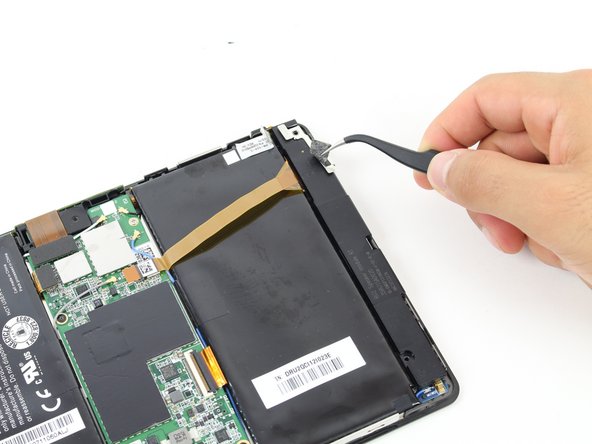
    2. BlackBerry PlayBook Speaker Replacement, Remove the Left Speaker Stickers: step 3, image 1 of 2 BlackBerry PlayBook Speaker Replacement, Remove the Left Speaker Stickers: step 3, image 2 of 2
      • Peel off the stickers holding the left speaker in place with a tweezer or by using your fingers

      Ask FixBot

      Add Comment

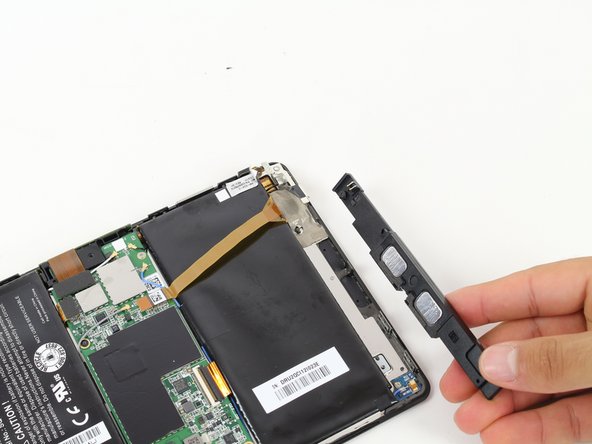
    3. BlackBerry PlayBook Speaker Replacement, Remove Left Speaker: step 4, image 1 of 2 BlackBerry PlayBook Speaker Replacement, Remove Left Speaker: step 4, image 2 of 2
      • Slide the left speaker bar out from its metal bracket.

      Ask FixBot

      Add Comment

    4. BlackBerry PlayBook Speaker Replacement, Unscrew Right Speaker: step 5, image 1 of 1
      • Remove both 1.5x4.25mm Phillips screws from the right speaker bar by using the Phillips Screwdriver.

      Ask FixBot

      Add Comment

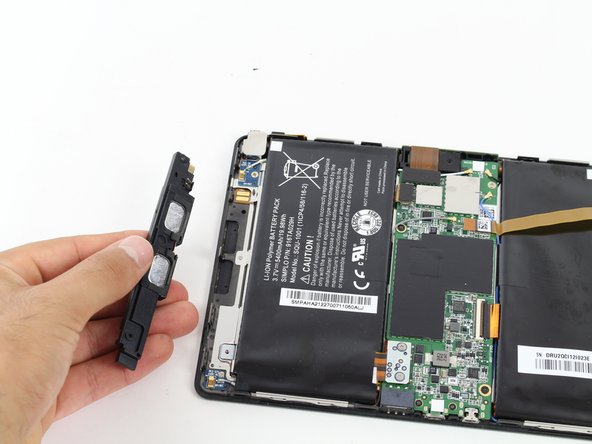
    5. BlackBerry PlayBook Speaker Replacement, Remove Right Speaker: step 6, image 1 of 2 BlackBerry PlayBook Speaker Replacement, Remove Right Speaker: step 6, image 2 of 2
      • Lift the right speaker bar to remove it.

      Ask FixBot

      Add Comment

Conclusion

To reassemble your device, follow these instructions in reverse order.

Cancel: I did not complete this guide.

One other person completed this guide.

Nathan

Member since: 10/12/14

682 Reputation

4 Guides authored

Team

Cal Poly, Team 14-27, Maness Fall 2014 Member of Cal Poly, Team 14-27, Maness Fall 2014

CPSU-MANESS-F14S14G27

4 Members

54 Guides authored

0 Guide Comments

Add Comment

View Statistics:

Past 24 Hours: 0

Past 7 Days: 6

Past 30 Days: 37

All Time: 1,441