Free Shipping on Domestic Orders $75+

BlackBerry KeyONE partial Disassembly

What you need

  1. BlackBerry KeyONE partial Disassembly, Remove top cover: step 1, image 1 of 1
    • Carefully remove the top plastic cover. It is held in place by adhesive.

    Ask FixBot

    Add Comment

  2. BlackBerry KeyONE partial Disassembly, Remove top frame: step 2, image 1 of 2 BlackBerry KeyONE partial Disassembly, Remove top frame: step 2, image 2 of 2
    • Remove the two Philipps #0 screws that hold in place the top of the phone frame and slide it off.

    Ask FixBot

    Add Comment

  3. BlackBerry KeyONE partial Disassembly, Remove back cover: step 3, image 1 of 1
    • Remove the back cover. It mostly just clips off, but has some adhesive in the lower area.

    Ask FixBot

    Add Comment

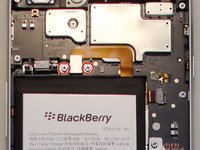
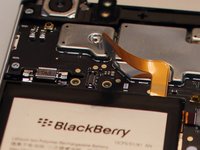
  4. BlackBerry KeyONE partial Disassembly, Disconnect Battery: step 4, image 1 of 2 BlackBerry KeyONE partial Disassembly, Disconnect Battery: step 4, image 2 of 2
    • Remove the two Philipps #0 screws securing the battery connector and unplug the later.

    Ask FixBot

    Add Comment

  5. BlackBerry KeyONE partial Disassembly: step 5, image 1 of 1
    • Remove the 6 Philipps #0 screws securing the lower cover and remove it.

    • Remove the three Philipps #0 screws holding down the bar that secures the two main lego-style plugs and remove it.

    Ask FixBot

    Add Comment

  6. BlackBerry KeyONE partial Disassembly, Remove top cover: step 6, image 1 of 1
    • Remove the three Philipps #0 screws securing the upper cover and remove it.

    Ask FixBot

    Add Comment

  7. BlackBerry KeyONE partial Disassembly: step 7, image 1 of 1
    • Unplug the remaining ribbon cables

    • Remove the last three Philipps #0 screws securing the Motherbard.

    • Now you should be able to replace most components.

    • The screen is held in place from the front by adhesive (or not, in the earlier versions), its cable slides trough the phone to the PCB - It's the large connector in the middle.

    • The battery is glued to the frame firmly. There are three pultabs located underneath the motherboard.

    • Don't forget to remove the sim-tray if you're removing the motherboard.

    Ask FixBot

    Add Comment

Conclusion

To reassemble your device, follow these instructions in reverse order.

Cancel: I did not complete this guide.

15 other people completed this guide.

raven

Member since: 09/02/15

1,110 Reputation

4 Guides authored

0 Guide Comments

Add Comment

View Statistics:

Past 24 Hours: 2

Past 7 Days: 13

Past 30 Days: 60

All Time: 10,838