Introduction
This guide will show you how to lubricate the power dial of your General Electric Telephone 2-9710A. Your power dial will operate smooth after completing this guide.
What you need
-
-
Using a plastic opening tool, remove the phone cord from the phone jack at the base of the headset.
 Ask FixBot
-
-
-
Remove the 7.5 mm screw.
-
Remove the screw cap.
-
Pull up the phone cord to remove it from the base.
-
-
-
Start by flipping over the device and locating the battery compartment door.
-
Remove the battery compartment door by applying thumb pressure to the area indicated on the battery door.
-
Remove the battery from the phone.
-
Start by inserting your new 9-volt battery in the correct orientation.
-
Once you have inserted your new 9-volt battery, turn over your device and start dialing in phone numbers or playing the radio to make sure everything works.
-
If your device does not turn on, it is likely that the battery isn't seated in the proper way.
-
-
-
-
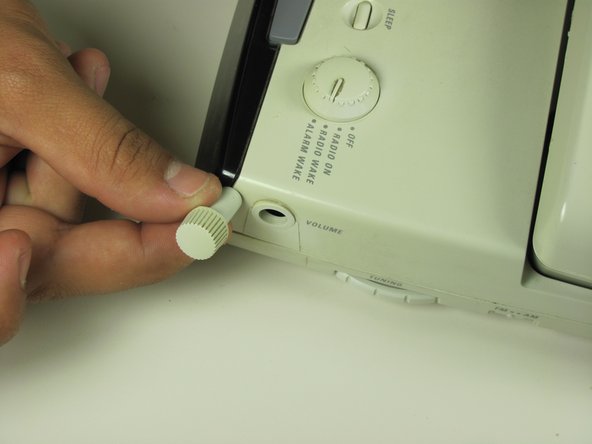
Locate the volume dial on the right side of the telephone.
-
Remove the volume dial by gently grasping it and pulling it away from the base.
-
-
-
Remove the three 12 mm screws with a Phillips #1 screwdriver.
-
Remove the three 18 mm screws with a Phillips #1 screwdriver.
-
-
-
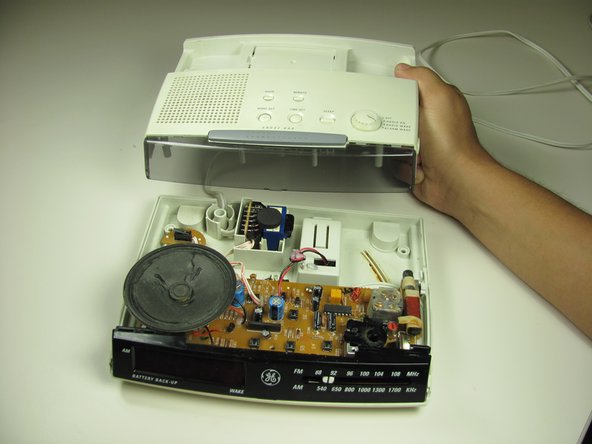
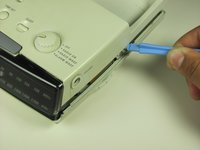
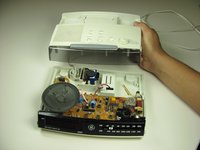
Pry off the base shell using a plastic opener tool.
-
Set the shell aside.
-
-
-
Inside the base shell on the circuit board, lubricate the power switch.
-





To reassemble your device, follow these instructions in reverse order.
Cancel: I did not complete this guide.
One other person completed this guide.

Team

Cal Poly, Team 16-59, Forte Fall 2012 Member of Cal Poly, Team 16-59, Forte Fall 2012
CPSU-FORTE-F12S16G59
4 Members
33 Guides authored
