
BenQ HT1075 Projector Fan Replacement

Gabriela Remulla and 3 other contributors
Last updated on Dec 29, 2017
Views: 8.8K
View statistics:
- Past 24 Hours:
- 7
- Past 7 Days:
- 35
- Past 30 Days:
- 134
- All Time:
- 8,799
Comments: 7
1 comment on steps, 6 guide comments.
Go to guide commentsCompleted: 8 9
8 people have marked this guide "completed." Will you be next?
9 people have marked this guide "completed." Including you — great job!
Favorites: 1 2
1 person has favorited (and subscribed to) this guide. Will you be next?
2 people have favorited (and subscribed to) this guide — including you!
Action Shots
Be an action hero! This guide needs images that better demonstrate how to perform specific actions.
Introduction
Go to step 1 ↓One of the most common problem associated with the BenQ HT1075 projector is overheating. Since all electronic equipment depend on the transfer of energy, components will eventually warm during run time. This is especially the case for projectors which also use bulbs that produce even more heat. Therefore, it is critical to keep a functioning fan at all times. This guide shows how to replace the projector fan, but it is also important to keep the fan clean from dust and particles that can potentially slow it down.
Note that the BenQ HT1075 Projector Lamp Replacement is a prerequisite since damage to the lamp is hazardous to both the projector and user.
What you need
Tools


-
-
-
Loosen the 2.5 mm Phillips #1 screw that holds the top assembly in place using a Philips #1 (PH1) screwdriver. This will enable you to lift and slide off the top cover.
-
Fully remove the top cover in order to get to the lamp housing.
 Ask FixBot
-
-
-
Using a Phillips #1 (PH1) screwdriver, loosen and remove the single 2.5 mm Phillips #1 screw that secures the lamp housing to the projector.
-
-
-
-
Remove the lamp from the projector by pulling on the lamp handle.
-
Apply more force on the side opposite of the newly removed screw as you pull the lamp out.
-
-
-
-
-
Turn the projector over (upside down) and remove the five 9.5 mm Philips #1 (PH1) screws that hold the projector together to its bottom cover.
-
-
-
Carefully, flip the projector back over to its upright position.
-
Using an opening tool, loosen then remove the top cover of the projector.
-
-
-
Unplug the wire that connects the front cover to the circuit board.
-
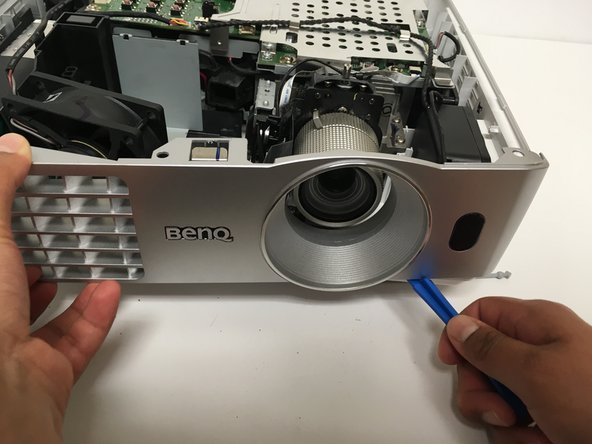
Now use the opening tool to pry the front cover from the platform .
-
Gently pull the cover from the rest of the frame.
-
-
-
Disconnect the wire that connects the main fan to the circuit board.
-
Carefully remove the fan by pulling it directly upwards from the base.
-
-




To reassemble your device, follow these instructions in reverse order.
Cancel: I did not complete this guide.
8 other people completed this guide.

Team

Cal Poly, Team S6-G1, Banghart Fall 2017 Member of Cal Poly, Team S6-G1, Banghart Fall 2017
CPSU-BANGHART-F17S6G1
5 Members
60 Guides authored
6 Guide Comments
adda ad07012db257300
What the model number for Fan 1(showing errors) & Fan 3 (0 Rpm after 15 minutes).
Thank you so much
Mode number of fan is ad07012db257300 as mentioned above. Looks like eBay is best place to get these but they are all from china. The specs for the fan are hard to find elsewhere. It must be the right size, 70x70x25 12v 4200rpm 3 pin
