Beats Studio First Generation Batteries Replacement

Oscar and
Last updated on Jun 19, 2015
Views: 155K
View statistics:
- Past 24 Hours:
- 4
- Past 7 Days:
- 51
- Past 30 Days:
- 235
- All Time:
- 154,576
Comments: 34
5 comments on steps, 29 guide comments.
Go to guide commentsCompleted: 24 25
24 people have marked this guide "completed." Will you be next?
25 people have marked this guide "completed." Including you — great job!
Favorites: 10 11
10 people have favorited (and subscribed to) this guide. Will you be next?
11 people have favorited (and subscribed to) this guide — including you!
Featured Student Guide
This guide has been the hard work of our awesome students and is found to be exceptionally cool by the iFixit staff.
Introduction
Go to step 1 ↓Don't worry, Dr. Dre is here! Changing the batteries is probably the easiest replacement procedure you can perform, so don't stress out and you'll be fine.
What you need

-
-
-
The left speaker is the speaker that holds the batteries and does not have the power switch.
 Ask FixBot
-
-
-
-
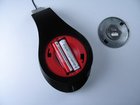
Place two fingers on each side of the cap. Press and twist counterclockwise to loosen the cap.
-
Once the cap is loose, simply lift the cap out to reveal the batteries.
-
-
-
Carefully pull the batteries out of their housings. When putting in new batteries, make sure that you place each battery in the correct orientation.
-
-


To reassemble your device, follow these instructions in reverse order.
Cancel: I did not complete this guide.
24 other people completed this guide.
Team

Cal Poly, Team 9-18, Regan Spring 2014 Member of Cal Poly, Team 9-18, Regan Spring 2014
CPSU-REGAN-S14S9G18
4 Members
72 Guides authored
29 Guide Comments
hi man you post is help me a lot thank you..God bless you
Are u using 4A batteries on this? Please reply ASAP. The 3a batteries won't fit on my beats wireless studio.
They are 2 x AAA batteries. This is Beats Studio first generation which are WIRED headphones.
